- DATE:
- AUTHOR:
- SAP LeanIX Product Team
Product update - May 2026
MCP apps bring visual architecture data directly into your AI client. SAP AI Agent Hub gained new discovery integrations, a unified governance extension, and asset verification. We also enhanced target architecture planning, redesigned the automations section, and made architecture decisions available in every workspace. Looking ahead to June, workspace admins will be able to set up calculations without writing code, and synchronization of your SAP Cloud ALM application library into your inventory is on the way.
Announcements
Upcoming major changes
June 10, 2026: Redesign of the inventory table view
June 30, 2026 / September 30, 2026: Keep visibility of past relations when running transformations
July 1, 2026: Deleting archived users after 90 days
July 3, 2026: SSO migration deadline approaching
Q2 - Q3 2026: Updated look and feel across your workspace
March 2027: Poll API deprecation: Transition to the new survey API
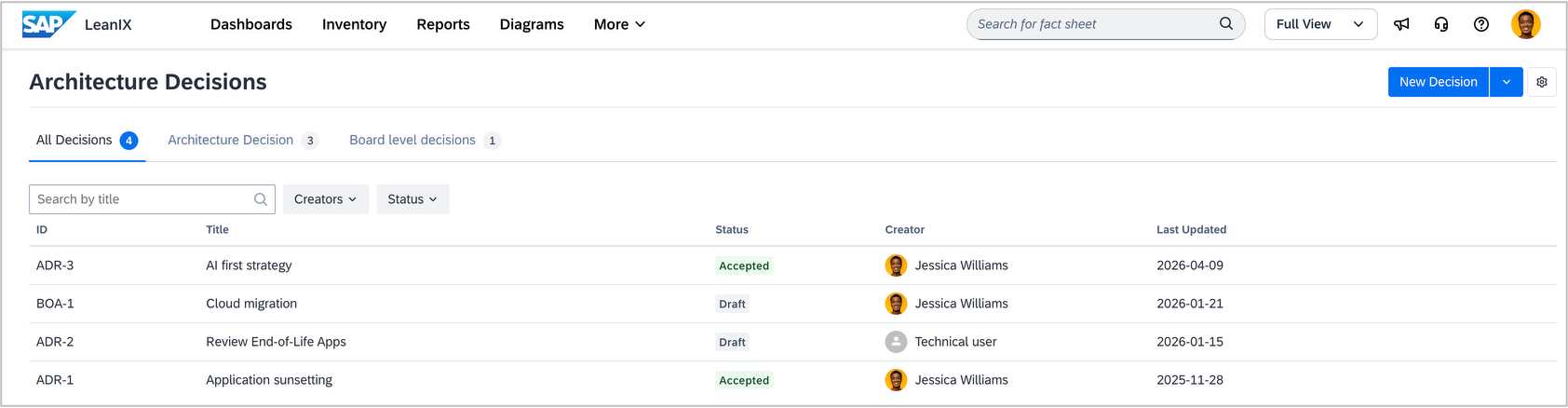
Architecture decisions now available in every workspace
Architecture decisions give you a structured way to document, track, and communicate the reasoning behind your enterprise architecture choices. Instead of scattering decisions across documents, emails, and spreadsheets, you manage them directly in your workspace, linked to the fact sheets and applications they affect. Decision-makers can collaboratively review, approve, or reject decisions, building a shared record of your organization's architecture strategy over time.
Architecture decisions are now available in every workspace. For example, when evaluating which technology platform to adopt, you can capture the options considered, the rationale behind your choice, and link it directly to the affected applications. You can also use them to document adoption rationale and compliance considerations for AI assets in your inventory.
If your workspace includes SAP LeanIX Architecture and Road Map Planning, your experience remains unchanged. Advanced capabilities, such as AI-assisted generation of architecture decisions from target architecture diagrams and full integration with transformation workflows, remain exclusive to those workspaces.

Stay on top of product updates
The product update you are reading now reaches over 26,000 subscribers and covers the most important SAP LeanIX product releases each month. But it is not the full picture.
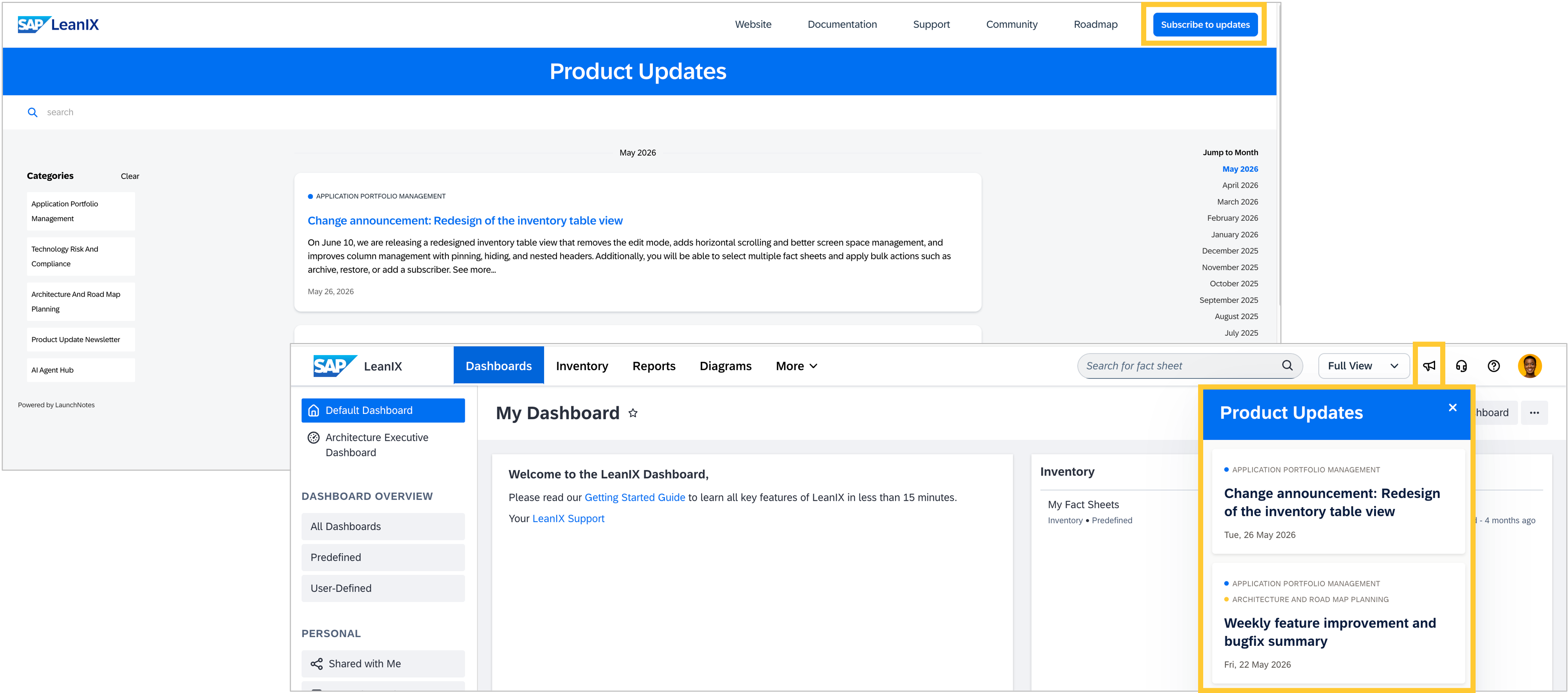
For more frequent and detailed updates, we also publish individual announcements for major feature releases and a weekly summary of smaller improvements and bug fixes. These are organized by product area: Application Portfolio Management, Technology Risk and Compliance, Architecture and Road Map Planning, and our newest category, SAP AI Agent Hub. Updates reach you through three channels: by email, in your workspace via the megaphone icon in the top navigation, and on the product update website updates.leanix.net. To receive them by email, subscribe to the categories that matter to you on the website. The categories you see in your workspace reflect your workspace setup.
Looking ahead, we are working on enabling the MCP server to read release announcements directly, so you will be able to retrieve product updates from within your AI client. We expect this to be available in mid-July.
Recent feature releases
See your architecture visually in your AI client via MCP apps
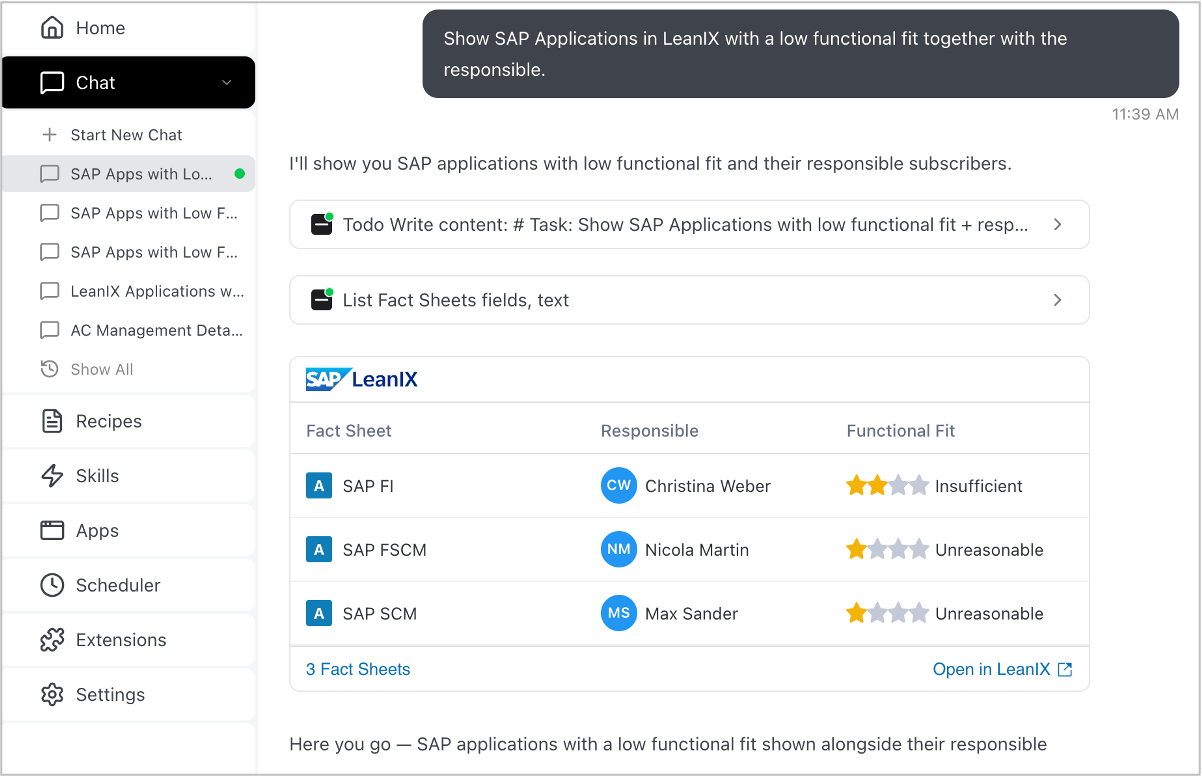
When you connect your AI client to your workspace via the MCP server, responses were previously purely text-based. Exploring a fact sheet or tracing application relationships meant switching back to your workspace to see what you actually need. MCP apps change that.
With MCP apps, you get interactive, visual representations of your architecture data directly in your AI client. No tab switching, no copy-pasting. Whether you are searching for fact sheets, reviewing the details of a specific entry, or navigating application relationships, the experience is delivered in the tool you are already working in.
The initial release includes three apps: a visual list view of fact sheet search results, a structured detail view of a specific fact sheet, and a relation explorer for navigating the relationships of any fact sheet in your inventory. All three build on your existing MCP server connection with seamless OAuth authentication, so there is nothing new to configure. This release is read-only; write capabilities are planned for subsequent releases.
To get started, you need signed AI terms and an active MCP server connection in your AI client. Once connected, your AI client will automatically discover and use the available apps.
Discover, verify, and govern AI assets with SAP AI Agent Hub
As AI agents, MCP servers, and models multiply across your organization, keeping track of what exists and whether it can be trusted becomes increasingly important. SAP AI Agent Hub, now available to a broader customer base through Joule Studio, gives you a unified place to do exactly that. As an existing SAP LeanIX customer, you continue to have full access to the AI Agent Hub within your current setup.
The journey starts with discovery. New integrations with ServiceNow and SAP AI Core automatically populate the hub with AI agents and active model deployments, so you do not have to maintain inventories manually.
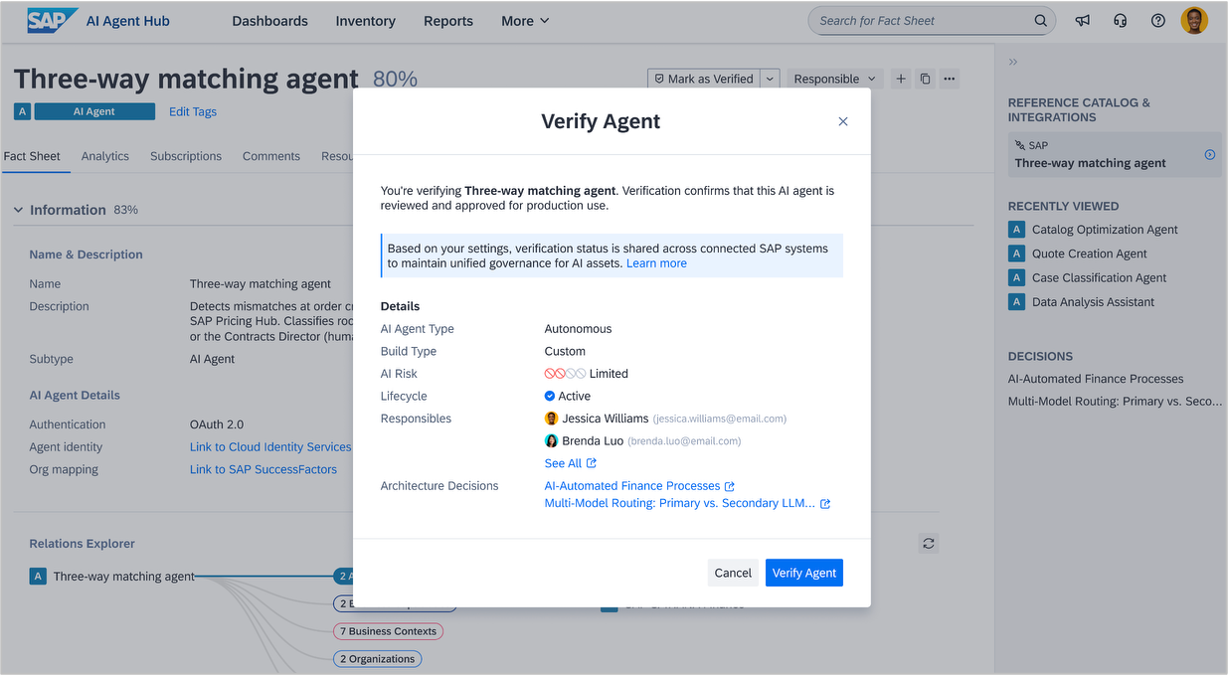
From there, you can verify and assess. Once discovered, each AI asset enters your workspace in an unverified state. When you assess it, you can mark it as verified, rejected, or unverified, and a verification badge appears on each fact sheet. This matters at runtime: Going forward, only agents marked as verified are authorized to run in production environments in Joule Studio. For MCP servers, the badge will also reflect verification status via SAP Integration Suite, giving your developers a clear signal about which servers are safe to use.
Supporting all of this is an evolved AI governance extension that replaces the two previous AI governance and adoption and AI agent extensions. It introduces dedicated fact sheet subtypes for AI agents, business applications, MCP servers, and AI models, along with attributes for usage, risk, and potential, a new AI agents report collection, executive dashboard KPIs, and automated business value calculations.
The extension is active by default in workspaces created after May 11, 2026. Older workspaces can enable it under Administration > Optional Features. If you have previously installed one or both of the earlier extensions, the SAP Help Portal provides guidance on what to do.
Close the gap between architectural design and transformation execution
In workspaces with SAP LeanIX Architecture and Road Map Planning, we have made improvements across the full target architecture planning journey: from designing the future state, to defining a plan, to governing its execution.
Design & decide
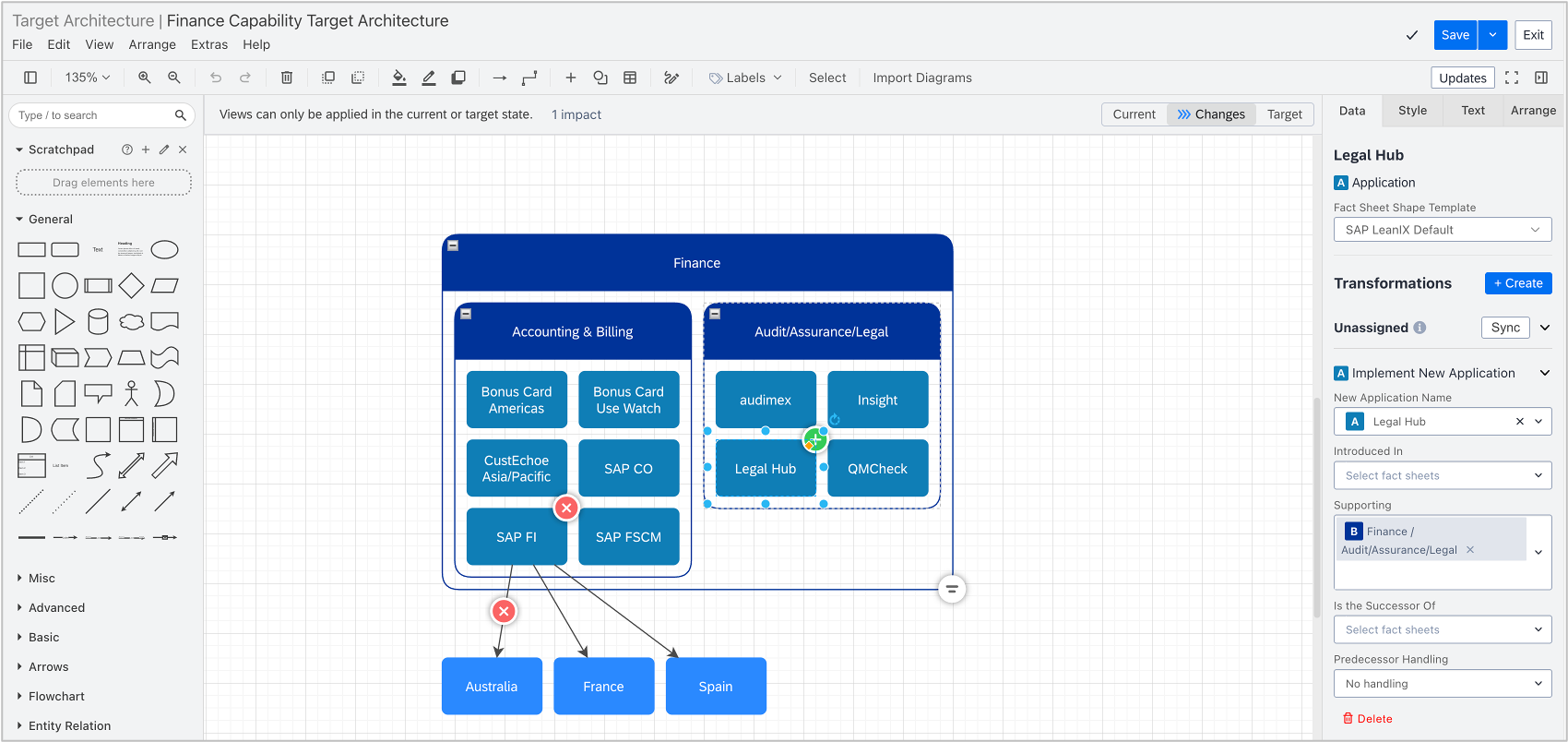
You can now design your target architecture in a dedicated diagram type. Starting from your existing as-is architecture, you add transformations using any transformation template and model the future state of your architectural landscape. You can switch between viewing the current state, the changes, and the target state.
Once your design is ready, a guided experience lets you assign transformations to existing or new initiatives in one workflow. You can also generate an AI-assisted architecture decision from the diagram, including a structured description of the planned changes and a list of affected fact sheets.
Plan
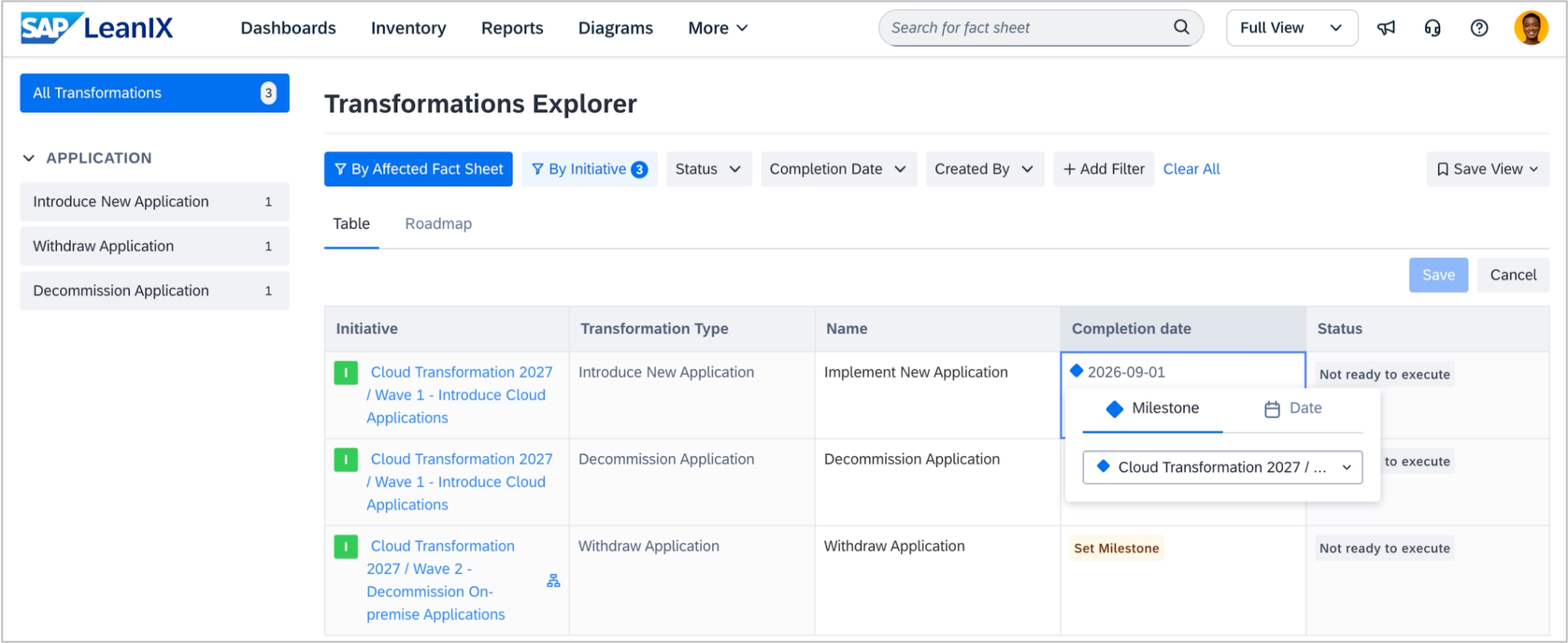
In the transformations explorer, transformations originating from diagrams are visually marked so you can trace their source, move them between initiatives, set milestones, jump back to the diagram, and navigate directly to the roadmap report.
Govern
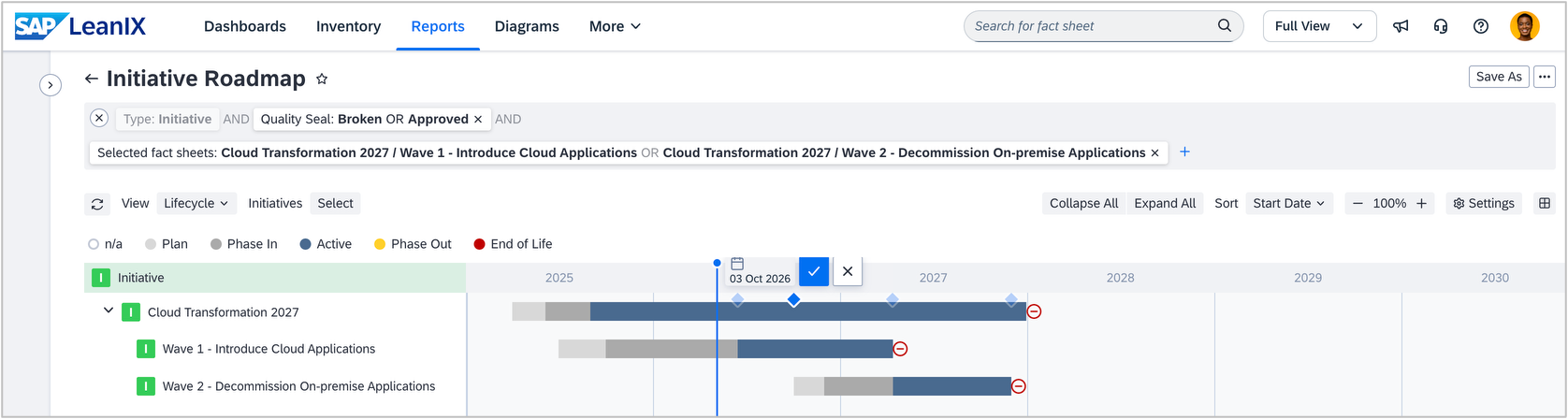
Once your plan is in place, the roadmap report provides an overview to track execution. It now supports visual milestone editing alongside a range of usability improvements, including zoom controls, exact dates on the timeline, currency formatting, and adjustable column widths. In the roadmap and any other report, the side panel now shows all transformations impacting a fact sheet, so you can review, execute, or edit them without leaving the report. The landscape report with the impact view shows which applications and IT components are affected by active initiatives and highlights at-risk transformations.
This is the first release of these target architecture planning capabilities, and we will continue building them out throughout 2026.
Create automations with ease within the redesigned automations section
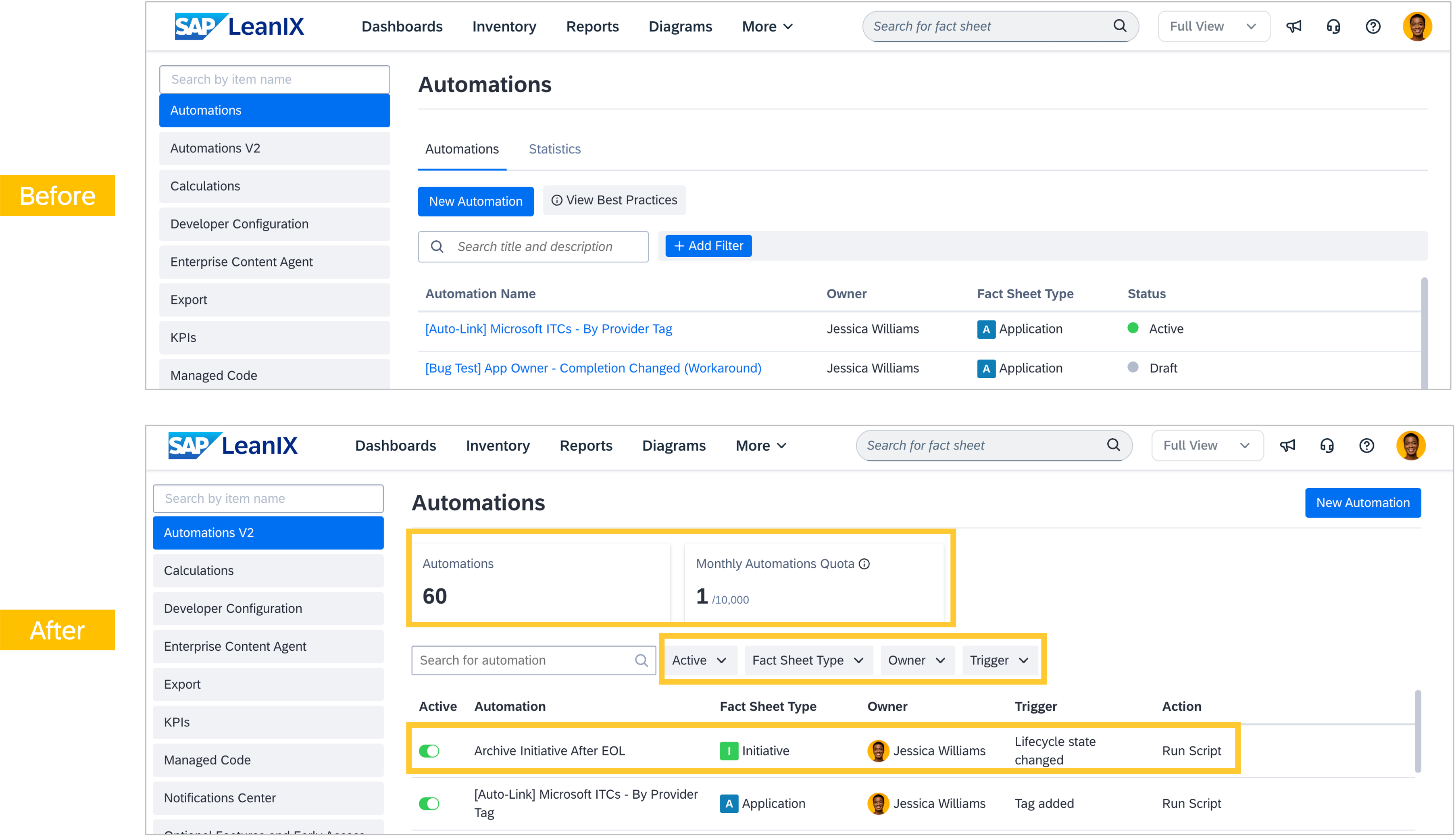
As announced, we have redesigned the automations section in the admin area to improve clarity and ease navigation as automation configurations grow in complexity. On the overview page, you can now see the total number of automations in your workspace and your monthly quota usage at a glance. New filters let you narrow the list of automations by fact sheet type, owner, or trigger, and each row will show the automation's primary action inline, with additional actions revealed on hover.
When editing an automation, the configuration page presents the complete flow of triggers, conditions, and actions as a step-by-step view, with a plain-text description of what it will do. This makes it significantly easier to understand what an automation does at a glance, reduces cognitive overhead for complex templates, and makes newer trigger types, conditions, and actions easier to discover.
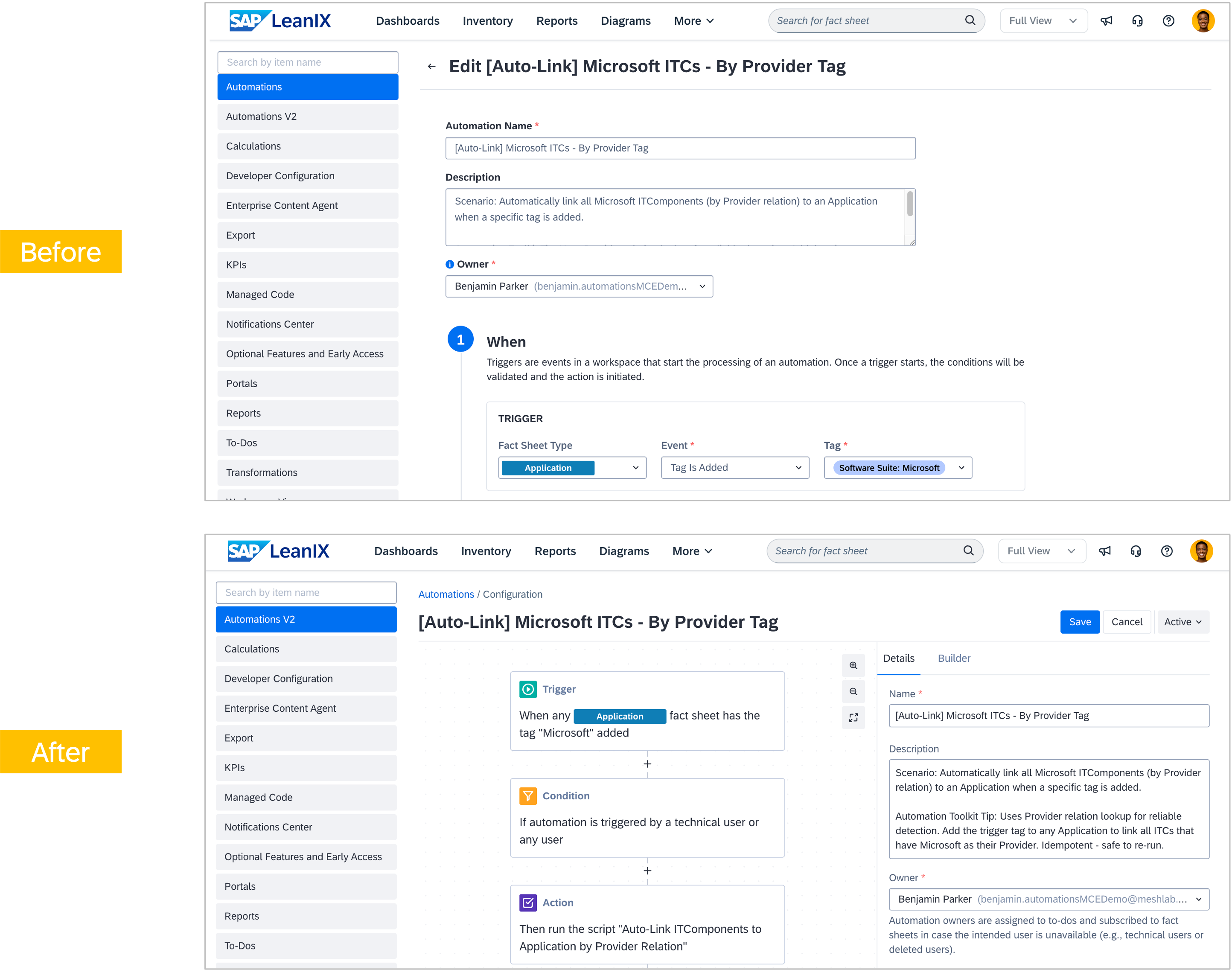
Existing automations have migrated automatically, which means no action is required on your part. This redesign also lays the groundwork for AI-powered automation authoring, where you can describe what you want to achieve in everyday language and have a draft automation template generated.
Features in progress
Set up calculations without writing code
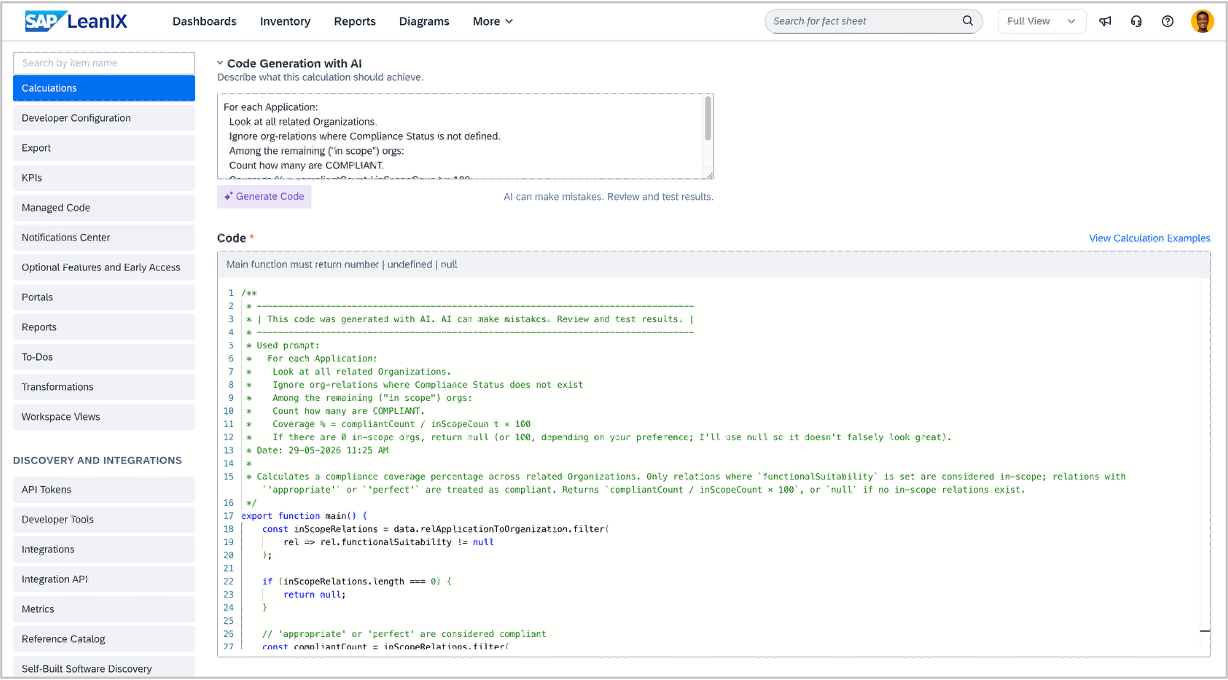
Starting late June, workspace admins will be able to set up fact sheet field calculations by describing a business rule in plain English, rather than writing JavaScript. This significantly lowers the bar: more admins can configure calculations independently, without relying on technical expertise.
Describe what you want in the calculations editor, and AI generates a ready-to-run result that is aware of your workspace's fact sheet types, fields, relations, and drop-down field options. The output is clean, commented, and fully readable, so you always know exactly what was generated. The feature will be available in all workspaces with signed AI terms.

Synchronize your application library entries from SAP Cloud ALM into your workspace
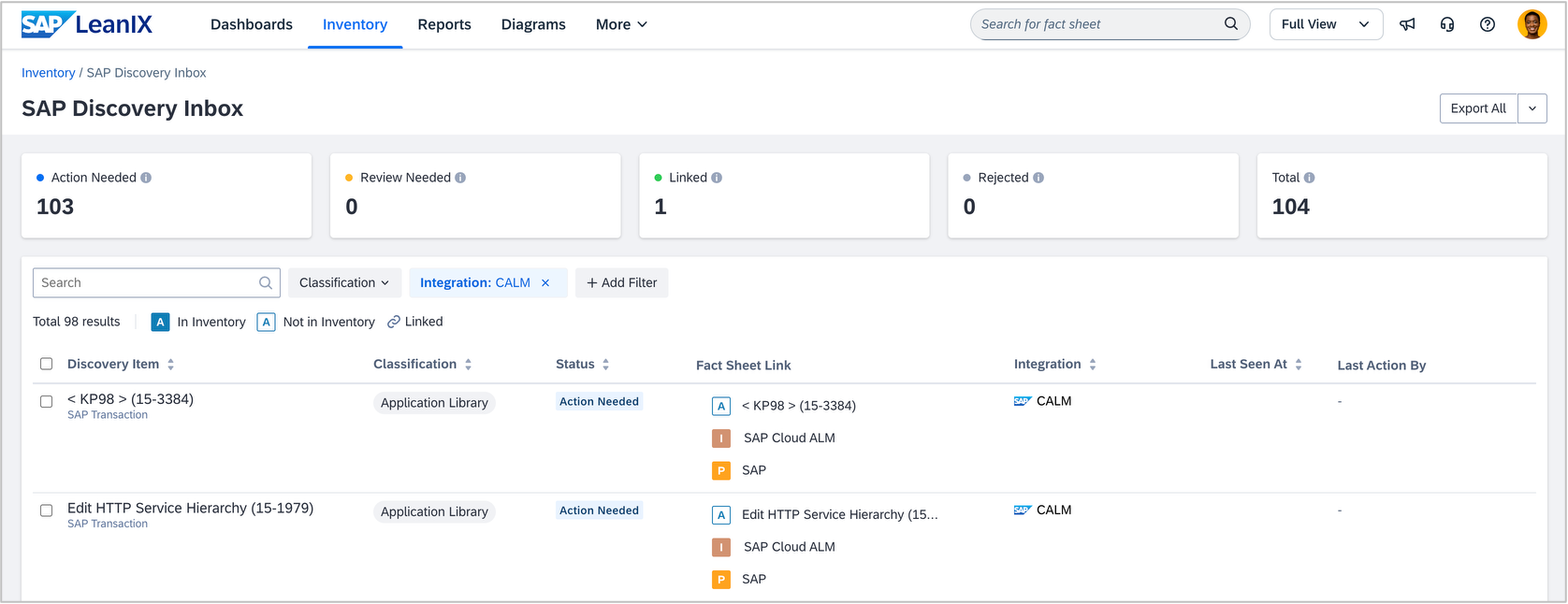
SAP Cloud ALM's application library is a central catalog for documenting available SAP Fiori applications, transactions, and programs. In a release planned for June, you will be able to synchronize these entries directly into your inventory through SAP discovery.
Application library items will arrive in the discovery inbox for review, creating a governed record of your extensions across the landscape and reducing manual reconciliation. If you are using SAP Cloud ALM, SAP Signavio, and your workspace together, process relationships stored in SAP Cloud ALM will be carried over as well, giving you a single trusted backbone for extension insights across transformation roadmaps and cloud migrations.
Events
Save the date - Learn about our product roadmap for Q3 2026
Mark your calendars for the SAP LeanIX product roadmap update Q3/2026 on July 9, 2026, at 5:00 pm CET / 11:00 am EDT.
Join our host and speakers from the SAP LeanIX product team for a deep dive into our product strategy 2026 to discover our latest features and work in progress on the Q3 2026 roadmap. We will share a registration page with you next month.
Call for speakers: SAP Transformation Excellence Summit 2026
We are looking for speakers for our summits in Atlanta (September 22–24) and Berlin (October 13–15). If you have insights to share on enterprise architecture, AI-driven transformation, or business-IT alignment, we invite you to submit a speaking proposal. We welcome submissions from customers, industry experts, and thought leaders alike.

Thank you for reading our newsletter. Join the SAP LeanIX Community to ask questions, get expert answers, find solutions to common challenges, and collaborate with others using SAP LeanIX. Stay updated on newly released features and bug fixes by checking out and subscribing to SAP LeanIX Product Updates. If you are reading this newsletter as an email, you can visit updates.leanix.net to view any explanatory videos embedded in this newsletter.
Visit our roadmap to see what's on the horizon and to share your feature ideas and feedback. If you want to report a bug or request a configuration change, let us know at SAP for Me.
Best Regards,
Your SAP LeanIX Team
SAP (Legal Disclosure | SAP)
This e-mail may contain trade secrets or privileged, undisclosed, or otherwise confidential information. If you have received this e-mail in error, you are hereby notified that any review, copying, or distribution of it is strictly prohibited. Please inform us immediately and destroy the original transmittal. Thank you for your cooperation.
You are receiving this e-mail for one or more of the following reasons: you are an SAP customer, you were an SAP customer, SAP was asked to contact you by one of your colleagues, you expressed interest in one or more of our products or services, or you participated in or expressed interest to participate in a webinar, seminar, or event. SAP Privacy Statement
This e-mail was sent to you on behalf of the SAP Group with which you have a business relationship. If you would like to have more information about your Data Controller(s), please click here to contact webmaster@sap.com.
This e-mail was sent to you by SAP and provides information on SAP’s products and services that may be of interest to you. If you received this e-mail in error, or if you no longer wish to receive communications from the SAP Group of companies, you can unsubscribe below.
To ensure you continue to receive SAP related information properly, please add updates@leanix.net to your address book or safe senders list.