- DATE:
- AUTHOR:
- SAP LeanIX Product Team
Product update - April 2026
This month, we share several new capabilities, including custom KPIs on the executive dashboard, the relaunch of the Store as the Extension Hub, and user-based access for the MPC server. We are also giving you an early look at upcoming visual improvements to your workspace. One important reminder: if your organization uses SSO to access SAP LeanIX, the migration deadline has been extended to July 3, 2026. This is a final extension. Additionally, starting July 1, archived users will be automatically deleted after 90 days. Read on for the full details.
Announcements
Upcoming major changes
May 13, 2026: Redesign of the automations section
June 30, 2026 / September 30, 2026: Keep visibility of past relations when running transformations
Extended and final deadline: July 3, 2026: SSO migration deadline approaching (see below)
NEW: Deleting archived users after 90 days (from 1 July onwards) (see below)
NEW: Q2 - Q3 2026: Updated look and feel across your workspace (see below)
March 2027: Poll API deprecation: Transition to the new survey API
Extended and final deadline to conduct SSO migration until July 3, 2026
As we have shared over the past months, organizations using Single Sign-On (SSO) to access SAP LeanIX must migrate to the new authentication service. We previously shared the deadline as May 15, 2026. We have now extended the deadline to July 3, 2026, to allow everyone to complete the migration in time. Please note that extending the deadline beyond this point will not be possible due to an expiring certificate. If you have not completed the migration by this date, access to the workspace will be interrupted.
Who needs to act?
This applies to organizations that currently use SSO for login authentication and were onboarded before July 2025. Detailed configuration guides are available on the SAP Help Portal — the migration can be completed independently, without contacting support. If your workspace uses username/password authentication, if you have already completed the migration, or if it was set up after July 2025, no action is required.
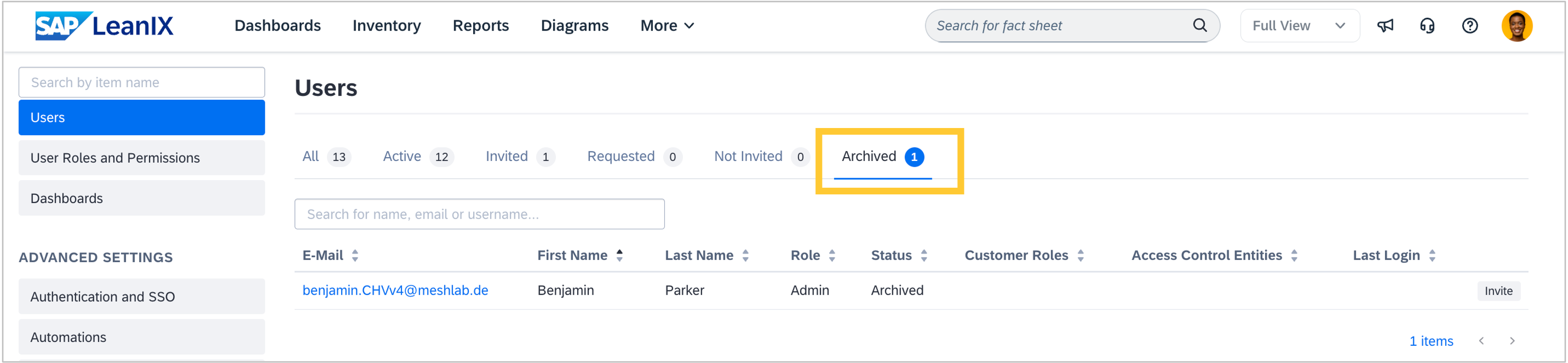
Archived users will be deleted after 90 days
Starting July 1st, 2026, SAP LeanIX will automatically delete archived users 90 days after they have been archived. Under the EU General Data Protection Regulation (GDPR) and similar privacy legislation, personal data must not be retained longer than necessary, and data subjects have the right to erasure. This change ensures compliance with these requirements and cannot be disabled. As an admin, you will notice this in the user management area of the admin section.
The rule applies to all archived users. For users archived on or before July 1st, 2026, the 90-day period starts on July 1st, which means they will be deleted on September 29th, 2026. For users archived after July 1st, deletion follows exactly 90 days from their individual archival date. For example, a user archived on July 15th, 2026, will be deleted on October 13th, 2026. Close to the change, you will find more information on the SAP Help Portal.
Updated look and feel across your workspace
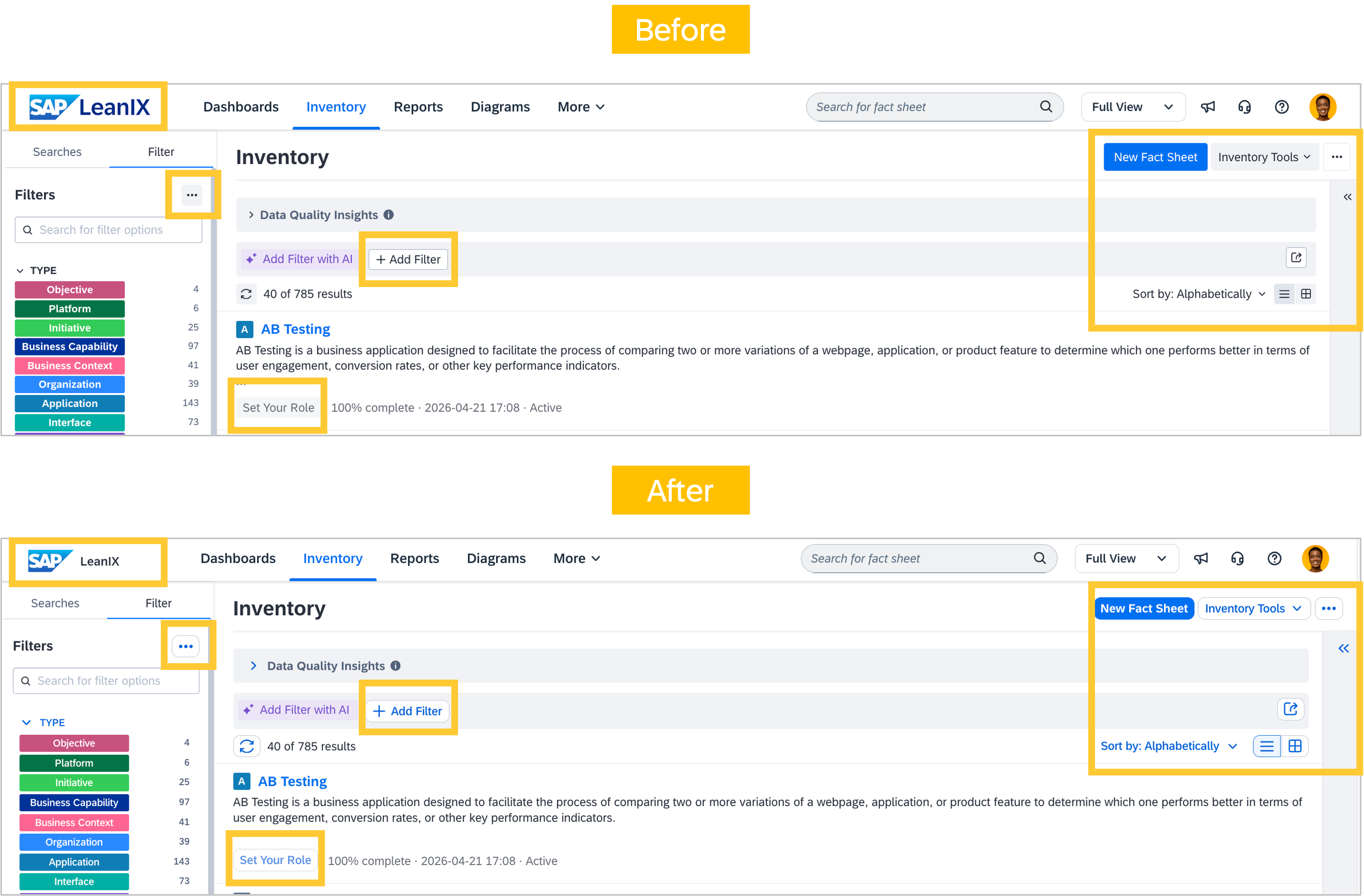
Over the coming months, you will notice visual changes across your workspace. Elements such as buttons, input fields, banners, and selection controls are being updated to align with SAP's design standards. This rollout will happen in stages throughout Q2 and Q3 2026. For customers using the predefined workspace design, the "SAP LeanIX" menu logo will change as well. Custom designs stay untouched.
These changes improve accessibility (such as higher contrast ratios and keyboard-activated button highlighting) and provide a more consistent visual experience. No workflows, features, or behaviors are affected. Everything works the same as before. We will keep you informed with each update as changes go live.
Recent feature releases
Include custom KPIs on the architecture executive dashboard
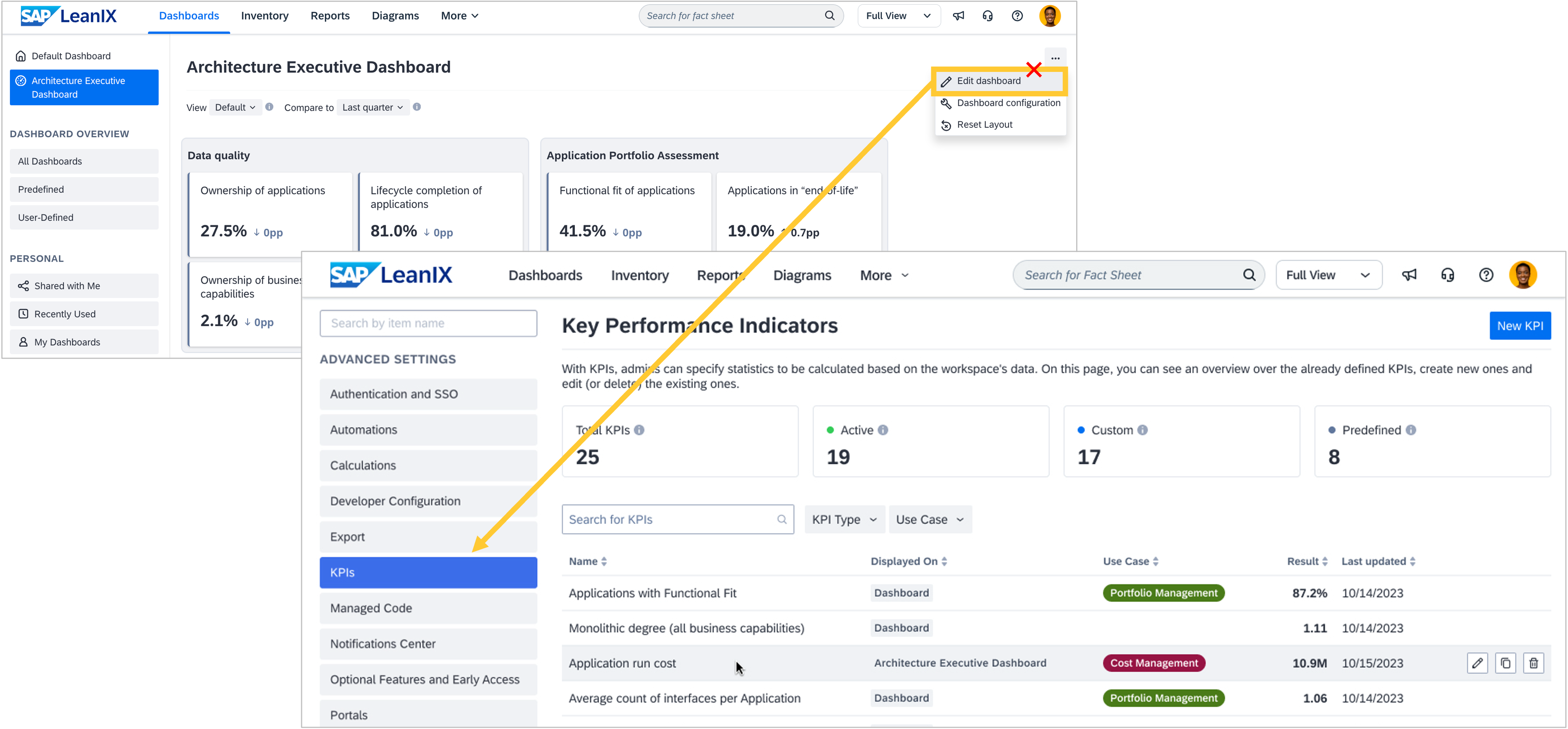
You can now include custom KPIs on the architecture executive dashboard, and we have consolidated KPI management for general and executive KPIs in your workspace. The ability to manage executive KPIs moved from the architecture executive dashboard edit mode to the KPI section in the admin area. Existing KPIs are automatically migrated, no KPI values are impacted or changed, and no action is required on your part.
With this release, the KPI section in the admin area becomes the single place to create, govern, and monitor all KPIs, including those shown on the architecture executive dashboard. As an admin, you can not only control which KPIs are displayed on the architecture executive dashboard, but also define your own groupings, names, and descriptions. This allows you to customize the architecture executive dashboard to your organization's needs. As a result of these improvements, the edit mode of the architecture executive dashboard has been retired, as it is no longer needed, with its functionality now in the admin area.

Use the MCP server with per-user access and custom meta model support
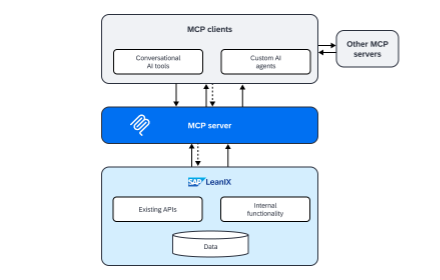
We have released three improvements to our MCP server, which make it easier to deploy AI agents across your organization at scale. The updates address access management, data model accuracy, and performance.
User-based access
AI agents using the MCP server can now authenticate on behalf of individual users via OAuth, rather than relying on shared tokens or manual permission management. You can roll out the MCP server to your entire organization without additional administrative overhead. Each user’s agent sessions automatically reflect their existing LeanIX permissions, ensuring architecture data is accessed securely and in line with individual access rights.
Better custom data model support
The MCP server now understands your workspace’s configured meta model better. Custom fact sheet names, renamed fields, and tailored attribute labels defined in your meta model configuration are reflected in agent interactions. Rather than only relying on technical identifiers, AI agents interact with your architecture data using the terminology your organization has established, thereby improving the accuracy and relevance of AI-generated outputs.
Default and optional toolsets
The MCP server has been enhanced with a set of default toolsets. This allows us to continue adding more and more optional toolsets that are not automatically included in the scope of the connected LLM. This improves token efficiency and scalability, giving organizations better control over what is loaded for each agent session without unnecessary overhead.
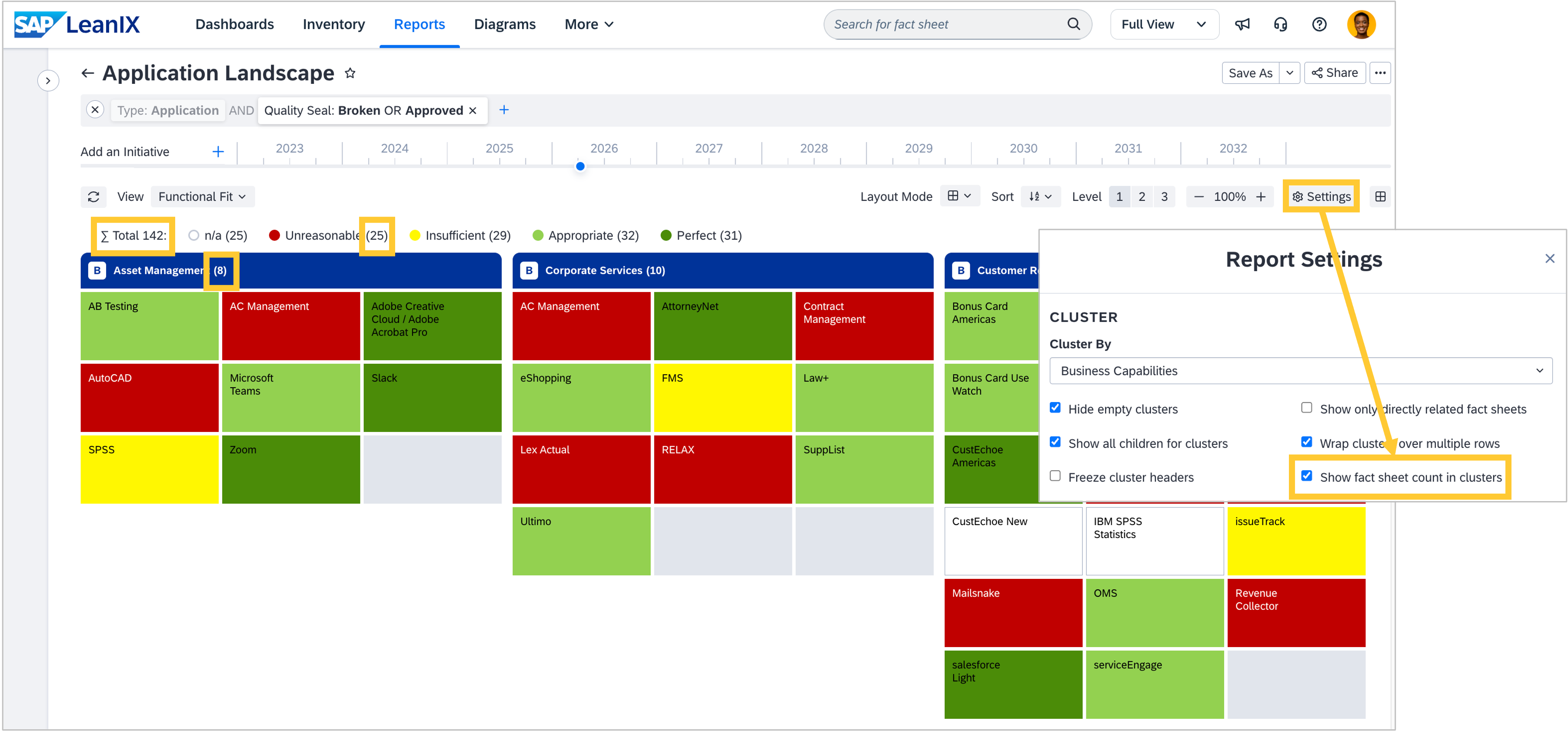
Sum up your landscape: Display fact sheet counts in landscape and matrix reports
When presenting your application landscape to stakeholders or assessing how many applications support a given business capability, getting accurate totals has meant counting manually. While the rolled-up layout in landscape and matrix reports already helped answer these questions, getting totals per cluster, per bucket within report views, or across the entire report still required manual calculation.
You can now display fact sheet counts directly in your landscape and matrix reports. Each cluster header and bucket label shows the number of fact sheets it contains, and the total report count (∑) is displayed at the top, so you always have the full picture at a glance. For both report types, enable counts in the report Settings menu by checking the "Show fact sheet count in clusters" box.
Discover workspace extensions in the relaunched extension hub
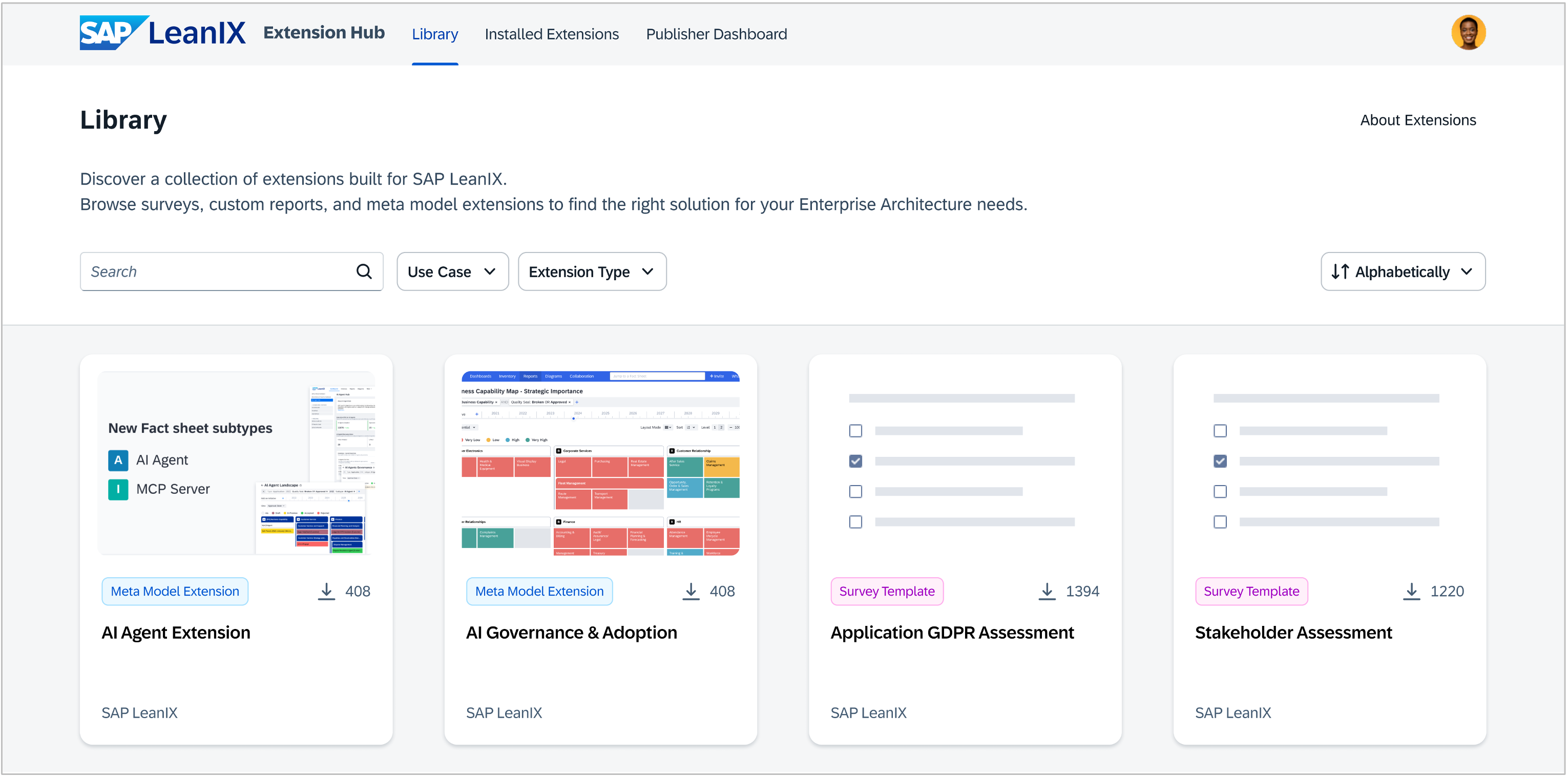
The SAP LeanIX Store has relaunched as the SAP LeanIX Extension hub — the first step in transforming how you can discover, implement, and share productized best practices and extensions. The vision is a unified, scalable hub that serves as the central repository for reusable configurations and customizations, empowering you to easily adopt and contribute extensions that enhance your SAP LeanIX experience.
The relaunch brings a new UI and expands the hub's content. Custom reports and survey templates remain available as extension types, and the extension hub introduces its first new extension type: Meta model extensions. Previously accessible only through the workspace admin area under Optional Features and Early Access, meta model extensions are now also available in the extension hub, where you can browse and discover them with a streamlined installation experience.
The main extension list filterable by type (i.e., reports, surveys, meta model extensions) is publicly visible, while installing an extension will be possible only for admins. Private extensions will still only be visible to you.
This initial release focuses on SAP LeanIX-sourced content, with the foundation in place to support more extension types and broader contributions in the future.
Features in progress
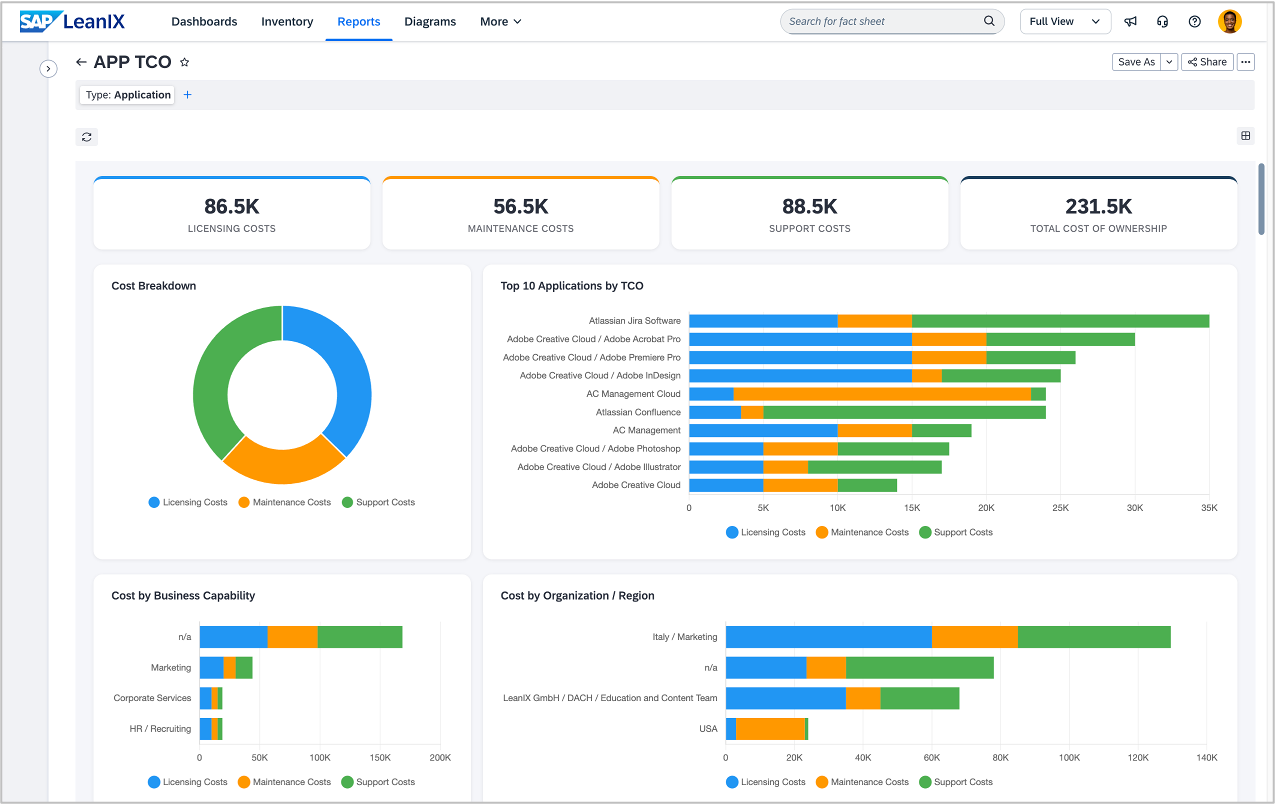
Build custom reports with your AI assistant
In June, we're adding new MCP server tools that let you describe the report you need in plain language and get a working result in minutes. Connect the MCP server to your coding environment with your preferred AI assistant, such as GitHub Copilot, Cline, or Claude Code, prompt it for the report you have in mind, and iterate until it looks right. No development expertise required, and your reports will be fully aware of your workspace's meta model configuration.

Get a head start on AI agent workflows with open-source plugins
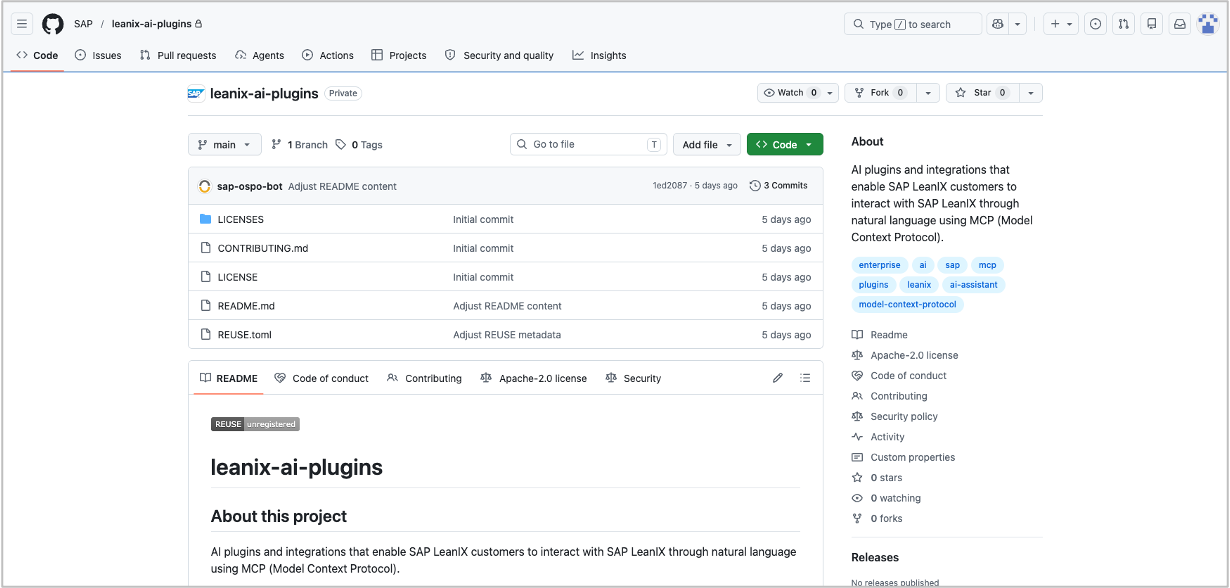
In June, we are launching an open-source repository for AI agents and skills built on the SAP LeanIX MCP server. It will come pre-loaded with a curated set of ready-to-use starting points. It is designed to grow through community contributions so teams can find, share, and extend agents that work with their inventory data.
Keep subscriptions accurate when people leave or change roles
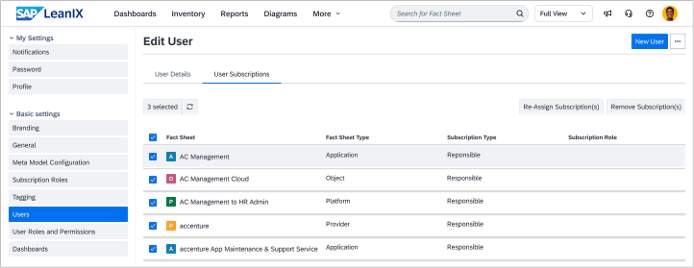
By mid-June, we will make it easier to manage what happens to fact sheet subscriptions and the ownership of diagrams and reports when someone leaves your organization or moves to a different role. Right now, tracking down and reassigning those is largely a manual process that can create gaps in responsibility. We're introducing two improvements to address this:
A cleaner interface for identifying archived users who still hold active subscriptions in your workspace
A self-service option for both users and workspace administrators to reassign or remove subscriptions, diagrams, and reports directly
Whether you're an admin tidying up after a departure or a user handing over responsibilities before moving on, the goal is to reduce manual effort and make sure nothing falls through the cracks.
Events
Register for the SAP Transformation Excellence Summits 2026
Registration is now open for the SAP Transformation Excellence Summits 2026. After our largest summit yet in 2025, this year's edition focuses on how organizations can harness the AI wave to drive transformation and innovation. Join us in Atlanta on September 22-24 or in Berlin on October 13-15.


Thank you for reading our newsletter. Join the SAP LeanIX Community to ask questions, get expert answers, find solutions to common challenges, and collaborate with others using SAP LeanIX. Stay updated on newly released features and bug fixes by checking out and subscribing to SAP LeanIX Product Updates. If you are reading this newsletter as an email, you can visit updates.leanix.net to view any explanatory videos embedded in this newsletter.
Visit our roadmap to see what's on the horizon and to share your feature ideas and feedback. If you want to report a bug or request a configuration change, let us know at SAP for Me.
Best Regards,
Your SAP LeanIX Team
SAP (Legal Disclosure | SAP)
This e-mail may contain trade secrets or privileged, undisclosed, or otherwise confidential information. If you have received this e-mail in error, you are hereby notified that any review, copying, or distribution of it is strictly prohibited. Please inform us immediately and destroy the original transmittal. Thank you for your cooperation.
You are receiving this e-mail for one or more of the following reasons: you are an SAP customer, you were an SAP customer, SAP was asked to contact you by one of your colleagues, you expressed interest in one or more of our products or services, or you participated in or expressed interest to participate in a webinar, seminar, or event. SAP Privacy Statement
This e-mail was sent to you on behalf of the SAP Group with which you have a business relationship. If you would like to have more information about your Data Controller(s), please click here to contact webmaster@sap.com.
This e-mail was sent to you by SAP and provides information on SAP’s products and services that may be of interest to you. If you received this e-mail in error, or if you no longer wish to receive communications from the SAP Group of companies, you can unsubscribe below.
To ensure you continue to receive SAP related information properly, please add updates@leanix.net to your address book or safe senders list.