- DATE:
- AUTHOR:
- SAP LeanIX Product Team
Product update - February 2026
We updated the newsletter's announcement section to provide you with an overview of major change initiatives. This is designed to give you a central place to track initiatives that may require action on your end. The headlines either include a link to the respective announcement or, for first announcements, you find the details in the 'Features in progress' section of this newsletter. The most important call to action is to review your SSO setup to ensure access to your workspace. Enjoy the detailed overview and near-term outlook.
Announcements
Upcoming major changes
February 28, 2026: SAP LeanIX Academy migrating to SAP Learning
March 16, 2026: Continue your work while importing data (see below under 'Features in progress')
March 31, 2026: Usage and adoption metrics move into your workspace - Gainsight 360 goes end of life (see below under 'Features in progress')
May 15, 2026: Update your SSO setup
March 2027: Poll API deprecation: Transition to the new survey API
Recent feature releases
Control fact sheet self-subscriptions through permissions
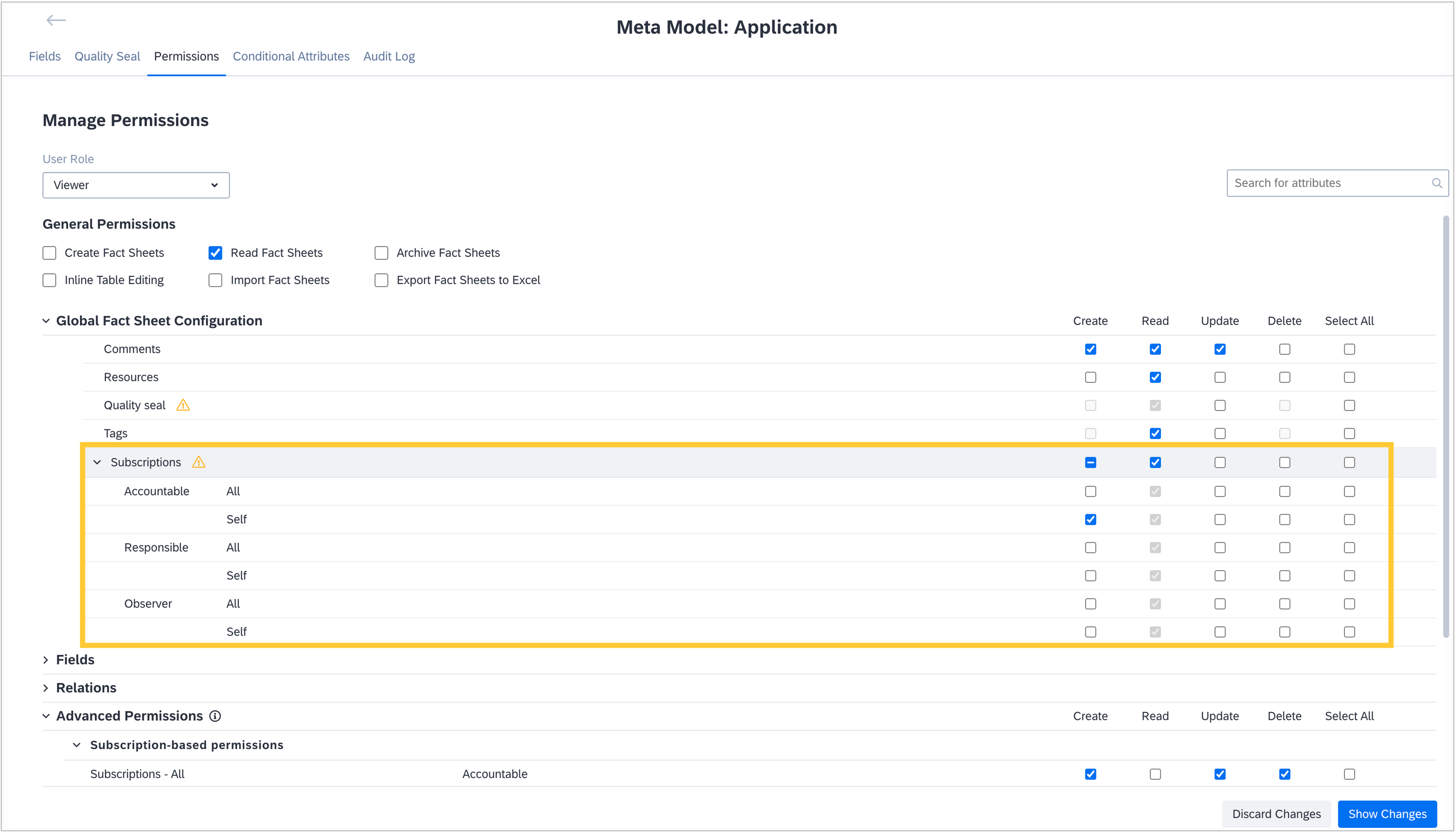
We have refined subscription permissions per fact sheet type to give admins precise control over which user roles can assign which subscription types. On the meta model configuration's "Permissions" tab, admins can now configure which subscription types users can create, update, delete, and read (where applicable) per role. Patterns like “Viewers may only subscribe as Observers and cannot assign Responsible or Accountable” prevent users from adding themselves as subscribers with higher privileges. To remove ambiguity, the self-subscription has been removed from "Advanced Permissions" and consolidated in the "General Permissions" section of each fact sheet type's permission configuration.
The updated permission management creates consistency across subscriptions and fact sheet attributes (fields and relations), avoiding partial overrides and ensuring permissions are enforced uniformly when individual field-level settings are unavailable. If you manage sensitive data on fact sheets, such as costs, these controls make it straightforward to restrict visibility and editing to Responsible or Accountable members only while limiting others to permitted summaries without exposing detailed costs. We recommend reviewing your role definitions and permissions to align subscription assignment rights with your operating model.

Sync Jira assets with your workspace using the Jira Service Management integration
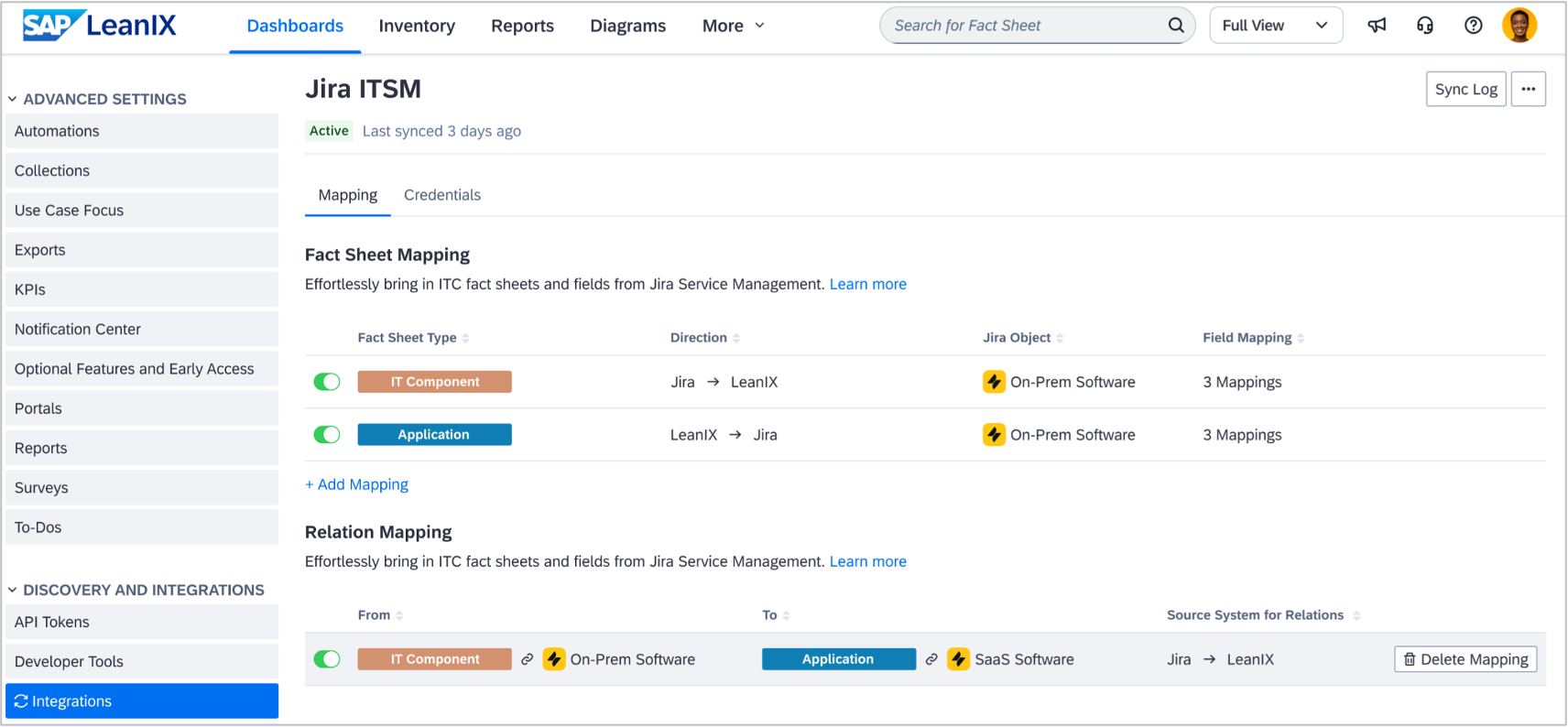
Atlassian's Jira Service Management is a growing IT service management tool used by agile teams to manage IT assets and configuration items and troubleshoot incidents. In such a high-velocity environment, IT operations and enterprise architecture are complementary, but seldom aligned. IT operations need a single source of truth for how Jira assets power critical applications in your portfolio. Enterprise architects need visibility into Jira assets to identify end-of-life risk and compliance drift. Now, you can do both. In workspaces with SAP LeanIX Technology Risk and Compliance, the new integration with Jira Service Management allows you to:
Sync Jira assets into your workspace as IT component fact sheets (software or hardware)
Map dependencies between Jira assets as IT component fact sheets and critical applications
Enrich Jira assets with lifecycle data (end-of-support/end-of-life) to identify risk before it becomes a problem
Sync applications from your workspace to Jira Service Management, aligning IT operations with enterprise architecture on a single source of truth for your IT and business landscape
You can now have the visibility you need into Jira assets, identify risk, ensure compliance with internal standards, and align enterprise architecture with IT operations. In subsequent iterations, we plan to further develop the integration, e.g., by enabling synchronization for additional field types and advanced synchronization settings.
Create and manage KPIs more efficiently
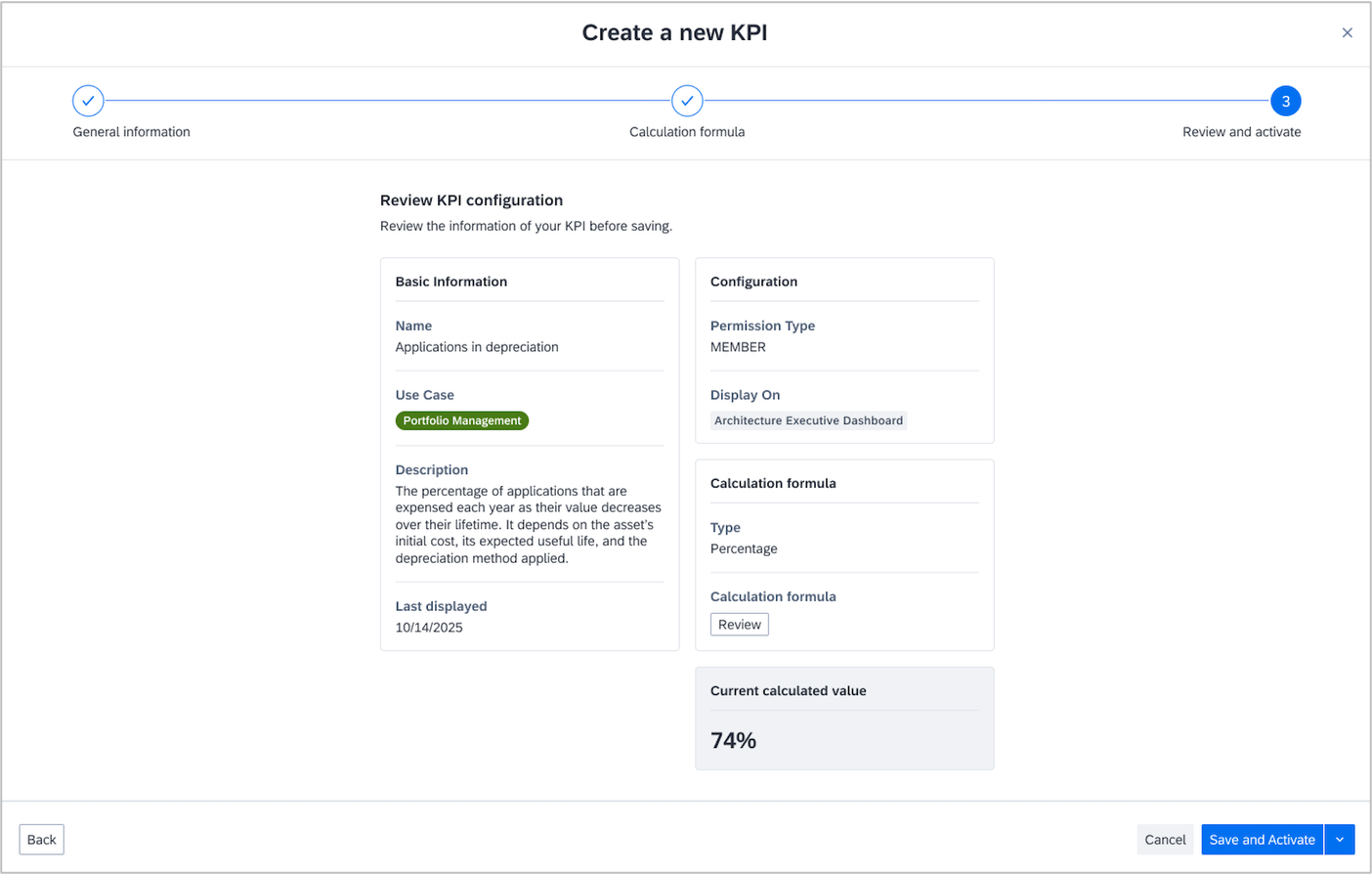
We undertook a major effort to enhance KPI usage across your workspace, enabling you to create KPIs more easily, tailor them to your specific needs, and maintain a consistent approach. We launched a new, guided, no-code UI in the administrator section of your workspace to create KPIs. Knowledge of JSON is no longer required to create your own KPIs, thereby removing a current hurdle. To create KPIs, we introduced percentage calculations and advanced filtering, which is closely aligned with the inventory filtering logic. All existing KPIs (JSON-based or filter-based) remain fully available and functional.
In Q2 and Q3, we will unify how you create and manage KPIs across your workspace. This will replace the current two parallel logics for general and executive KPIs. This will ensure consistency, simpler training, and less cognitive load for users. The executive KPIs on the Architecture Executive Dashboard will be migrated into the same updated KPI area in the administrator section for a unified experience. Additionally, you will also be able to create custom executive KPIs.
Identify missing data on application fact sheets
The applications in your inventory are the cornerstone of your IT landscape and many architectural decisions. To increase awareness among application owners of missing data in their applications, we have introduced data quality insights on top of the inventory.
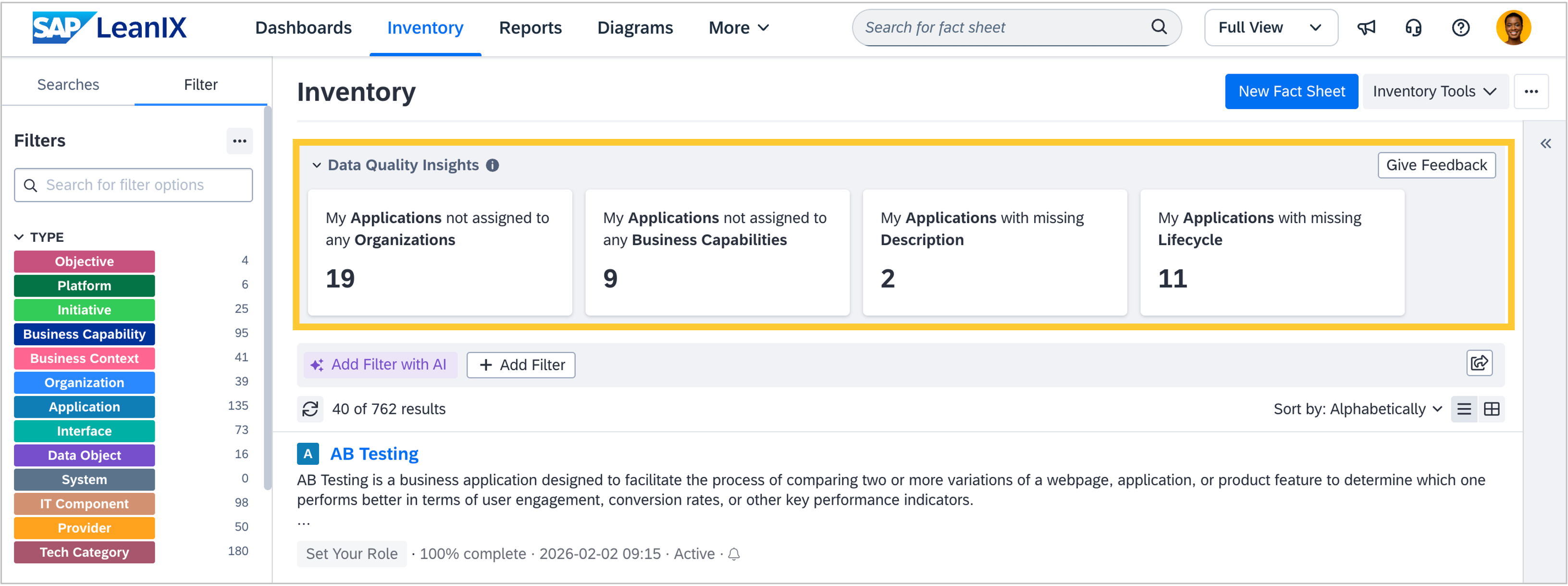
Data quality insights are an optional feature that is turned off by default in all workspaces. Admins can switch it on in the "Optional Features" section of the admin area. Once enabled, four cards will display the number of applications that lack a description, lifecycle, or relation to an organization or business capability fact sheet. They will be visible to users with edit rights who are subscribed to at least one fact sheet that lacks the above-mentioned data, regardless of subscription type or role (including custom roles). Selecting a card will filter the inventory to the respective applications lacking data. As a user, you can collapse the insights element to save space. We recommend turning on data quality insights to improve data quality in your workspace.
We are interested in receiving your feedback on this new functionality. Please use the feedback button in the top-right corner to share your thoughts and help us improve the functionality further. We will closely monitor adoption and feedback over the next weeks and may enable the feature for all workspaces by the end of Q1. We will notify you at least two weeks in advance of any change and give you the possibility to keep the feature turned off.
Features in progress
Continue your work while importing data
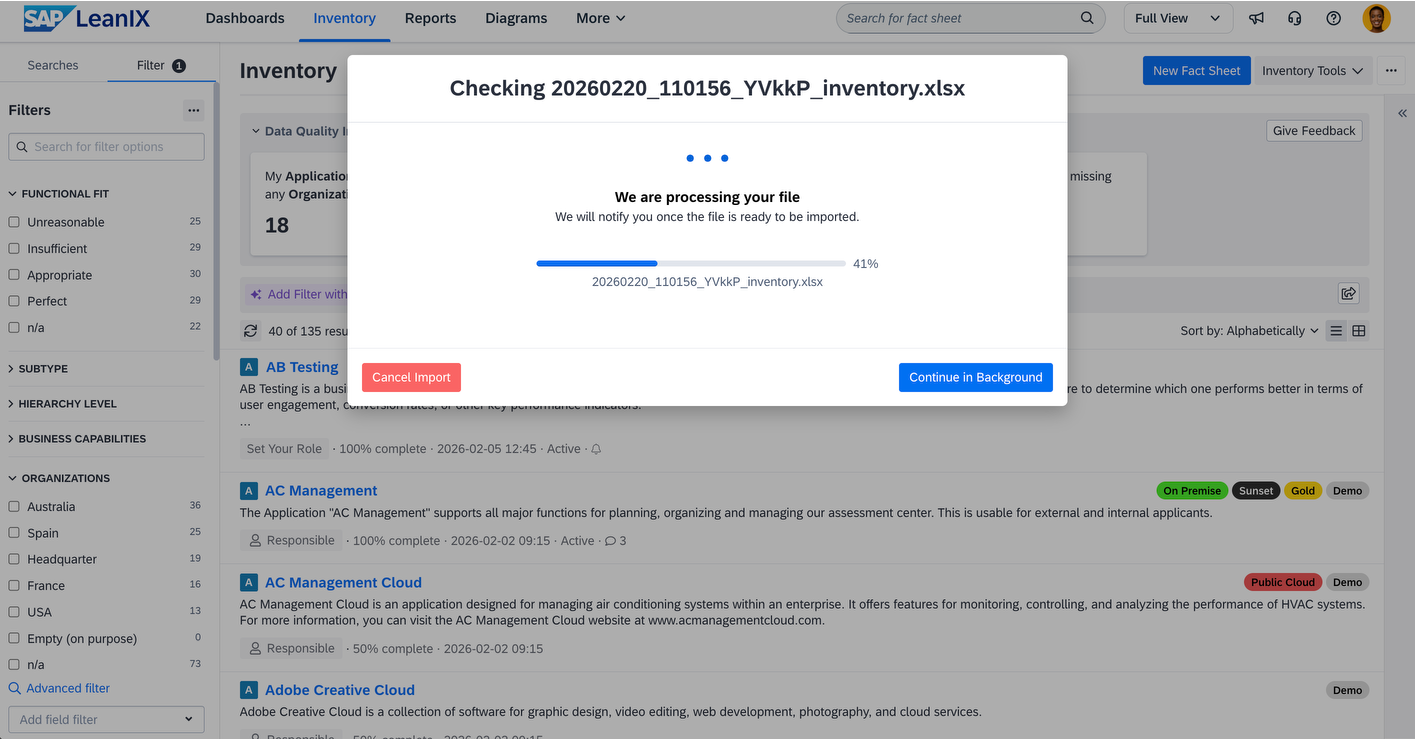
We are introducing a significant upgrade to the Excel import experience designed to enhance resilience and greater scalability while preserving the familiar workflow you rely on for bulk importing data into your workspace. The new asynchronous import process runs entirely in the background, allowing you to continue your work in parallel. A real-time progress widget in the inventory side-panel keeps you informed of import status, and you will be prompted to review and accept results upon completion. This enhancement also improves error resilience through a single-line processing architecture, which better handles cross-referenced data within import files, addressing dependency scenarios that previously required careful manual management. For very large imports, the import runtime may vary with the new architecture. However, import performance for more than 95% should not change. We are actively optimizing performance to ensure processing times remain comparable to those of the previous import experience.
Implementation timeline:
March 1–15, 2026: Transition period with access to both import experiences for testing and feedback. The new import version is enabled by default. You can switch back to the previous experience on the import widget.
March 16, 2026: Modernized import becomes the standard experience; the classical version will be retired.
We encourage you to explore the new import experience during the transition period and provide feedback to ensure optimal preparation for the transition on March 16. This upgrade represents our commitment to providing robust, scalable tools that support your enterprise architecture objectives while maintaining workflow continuity.

Usage and adoption metrics move into your workspace – Gainsight Shared 360 goes end of life
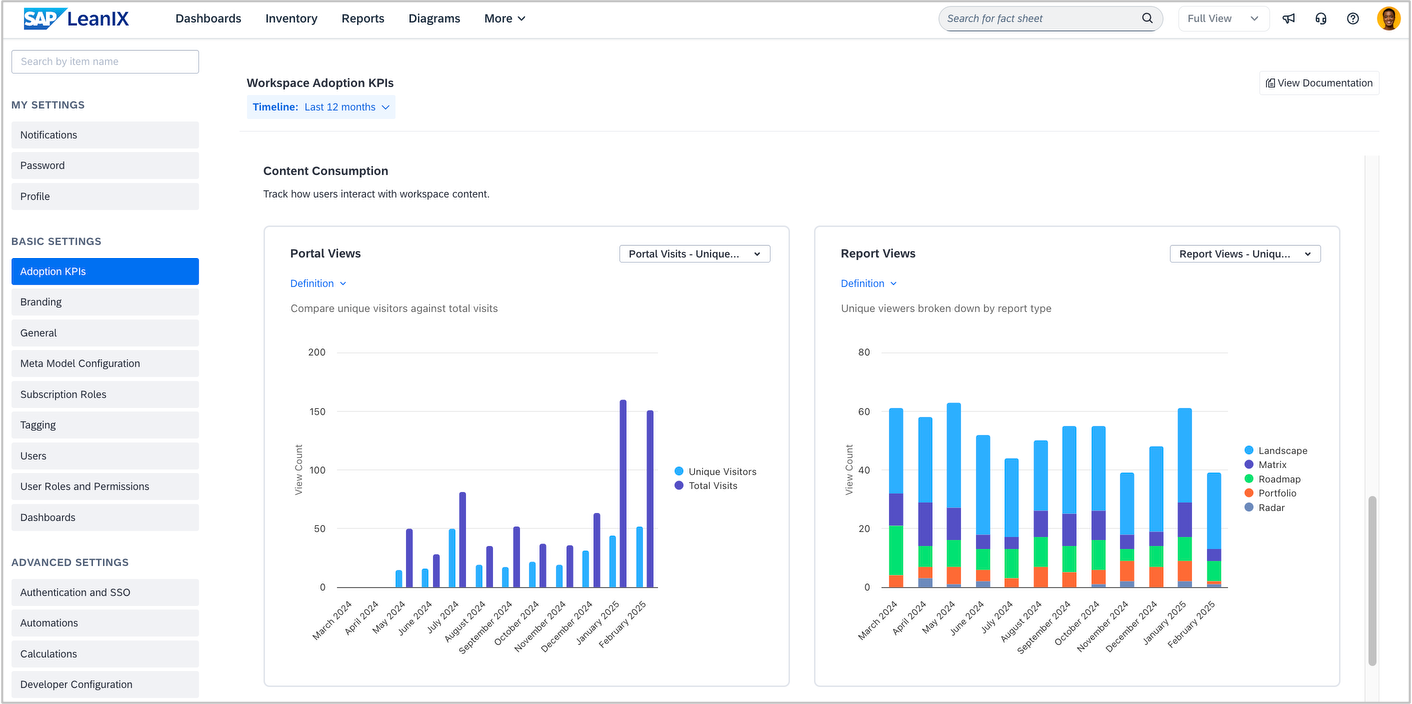
We are excited to share that the usage and adoption metrics (e.g., number of workspace log-ins, number of report views) previously available in Gainsight Shared 360 are transitioning into your SAP LeanIX workspace. Shared Gainsight 360 will be deprecated by the end of March. This means admins can access adoption metrics directly from the workspace admin area without relying on an external dashboard with a separate login. As part of the change, we have streamlined and refined our metrics to provide deeper insights, for example, by including logins broken down by user attributes and consumption data for diagrams and dashboards. We plan to release the in-product functionality by mid-March and will inform you in a separate announcement and via the SAP Help Portal.
In addition to the usage and adoption metrics, the Gainsight Shared 360 contained information on raised support tickets and product ideas. You can continue to access your support tickets via SAP for Me. As of now, the status of submitted product ideas will no longer be visible after March 31, 2026. We have already started to assess different ways to reintroduce the previous functionality. To share updates as they become available, we have created a portal card on our public roadmap where you can see the status. The overall feedback process for new ideas remains unchanged, so please continue submitting feedback and ideas. Your CSM can provide status updates on specific submissions upon request.
Events
Save the date - Learn about our product roadmap for Q2 2026
Mark your calendars for the SAP LeanIX product roadmap update Q2/2026 on April 16, 2026, at 5:00 pm CET / 11:00 am EDT.
Join our host and speakers from the SAP LeanIX product team for a deep dive into our product strategy 2026 to discover our latest features and work in progress on the Q2 2026 roadmap. We will share a registration page with you in the next month.
SAP Sapphire – three inspiring days to connect, learn, and explore
Meet us at SAP Sapphire to learn how SAP LeanIX helps navigate the complexity and risk towards becoming AI-native, automate IT visibility, and maximize tech ROI. Join our experts at this flagship event for roadmap sessions, EA deep dives, and hands-on discussions to help you plan, design, and manage AI-driven change in your organization.
SAP Sapphire Orlando, May 11–13, 2026
SAP Sapphire Virtual, May 12–13, 2026
SAP Sapphire Madrid, May 19–21, 2026

Thank you for reading our newsletter. Join the SAP LeanIX Community to ask questions, get expert answers, find solutions to common challenges, and collaborate with others using SAP LeanIX. Stay updated on newly released features and bug fixes by checking out and subscribing to SAP LeanIX Product Updates. If you are reading this newsletter as an email, you can visit updates.leanix.net to view any explanatory videos embedded in this newsletter.
Visit our roadmap to see what's on the horizon and to share your feature ideas and feedback. If you want to report a bug or request a configuration change, let us know at SAP for Me.
Best Regards,
Your SAP LeanIX Team
SAP (Legal Disclosure | SAP)
This e-mail may contain trade secrets or privileged, undisclosed, or otherwise confidential information. If you have received this e-mail in error, you are hereby notified that any review, copying, or distribution of it is strictly prohibited. Please inform us immediately and destroy the original transmittal. Thank you for your cooperation.
You are receiving this e-mail for one or more of the following reasons: you are an SAP customer, you were an SAP customer, SAP was asked to contact you by one of your colleagues, you expressed interest in one or more of our products or services, or you participated in or expressed interest to participate in a webinar, seminar, or event. SAP Privacy Statement
This e-mail was sent to you on behalf of the SAP Group with which you have a business relationship. If you would like to have more information about your Data Controller(s), please click here to contact webmaster@sap.com.
This e-mail was sent to you by SAP and provides information on SAP’s products and services that may be of interest to you. If you received this e-mail in error, or if you no longer wish to receive communications from the SAP Group of companies, you can unsubscribe below.
To ensure you continue to receive SAP related information properly, please add updates@leanix.net to your address book or safe senders list.