- DATE:
- AUTHOR:
- SAP LeanIX Product Team
Weekly feature improvement and bugfix summary
Change announcement
On March 31, we will release improvements to our roadmap and landscape reports to increase consistency and usability. As some of these changes modify existing behavior, we want to give you advance notice.
We are making three improvements to the roadmap report:
Consistent end-of-life display: Currently, end-of-life (EOL) dates on roadmap items appear as either an icon or a colored bar, depending on a report setting. With this release, EOL will consistently be displayed as a point-in-time icon across all roadmap items, and the bar-based display setting will be removed. Drill-down items — such as IT components shown within an application's lifecycle — will continue to show the EOL bar where it provides necessary context, for example, when a component reached EOL before the parent application became active. Please note: if you currently use the bar-based EOL display in saved report bookmarks, the display will automatically switch to the icon representation.
Selected view applied to drill-downs: Today, the roadmap report always shows the lifecycle view for drill-down items, regardless of the view you select for the main items. This can lead to confusion when the drill-down colors do not match the report legend. With this release, your selected view will apply to all bars, including drill-downs. This is consistent with how the landscape and matrix reports already behave. Please note: drill-down items in existing reports and bookmarks will begin reflecting the selected view rather than defaulting to the lifecycle view.
Off-viewport indicators and navigation: When you zoom into a specific timeline range, bars that fall outside the visible area can be difficult to locate. With this release, small arrow indicators will appear at the edges of each row to show where off-screen bars are located. Hovering over an arrow reveals the bar's start or end date, and clicking it scrolls directly to the bar. This makes it much easier to navigate large roadmaps without losing your place or accidentally triggering browser back navigation.
When you open a landscape report, if you use the "SAP Suggestions in Your Landscape" meta model extension, the suggestions dropdown will be visible by default. Currently, the dropdown is hidden and has to be manually expanded. This change helps you discover and act on SAP suggestions more easily.
We will inform you once the updates have been implemented.
Inventory
As announced in our February product update newsletter, starting March 16, the new background Excel import becomes the sole experience — the previous version will be retired. The import runs in the background, so you can continue working while your data imports. A progress widget in the inventory side-panel keeps you informed, and you'll be prompted to review results once complete.
Diagrams
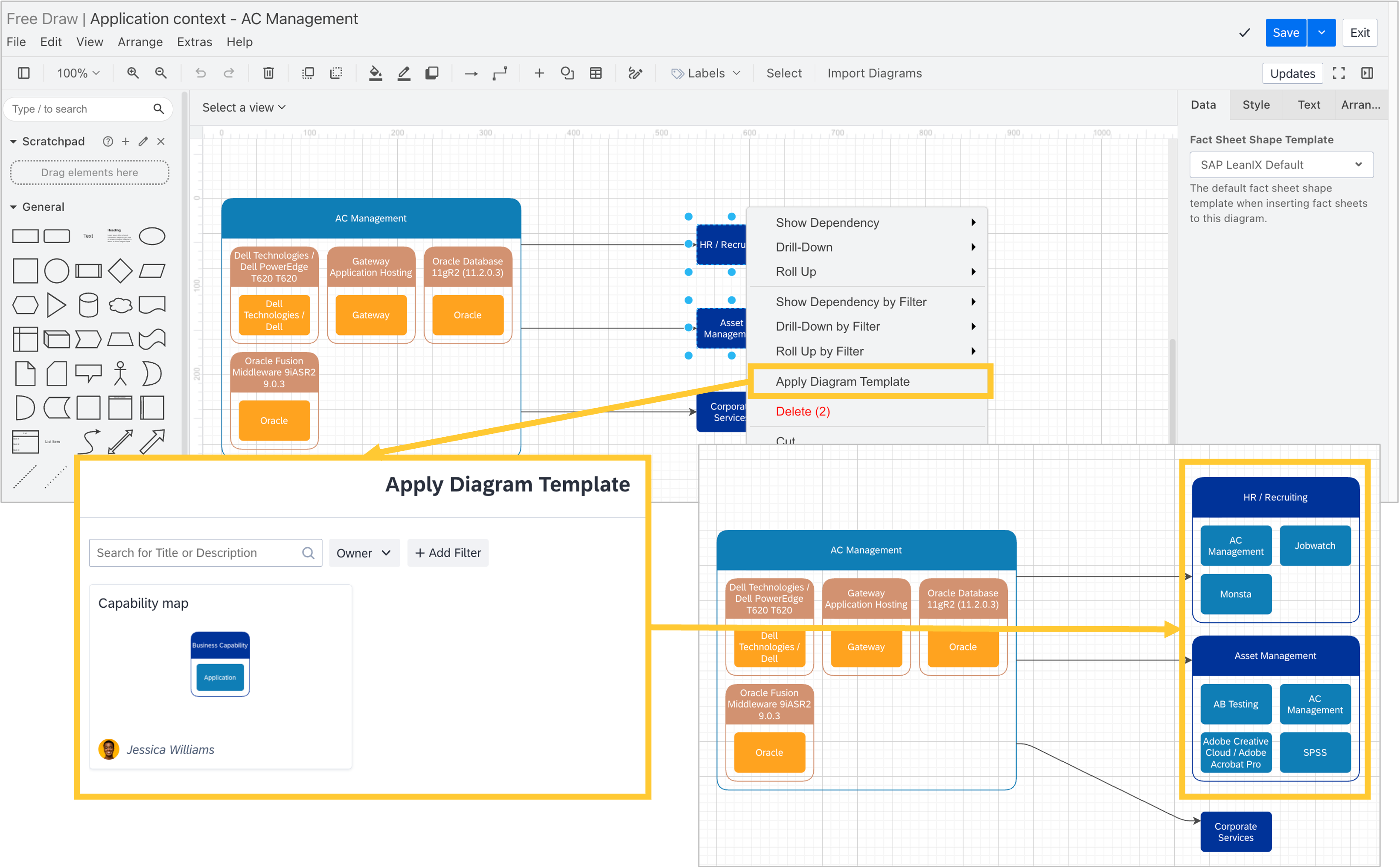
You can now apply diagram templates directly within the free draw diagrams canvas. Select up to five fact sheets of the same type, open the context menu, and choose a template to generate a structured diagram from your selection. This brings the convenience of templates into the flexible free draw canvas, helping you create consistent visualizations faster.
Transformations
In workspaces with SAP Architecture and Road Map Planning, we have made two improvements to transformations:
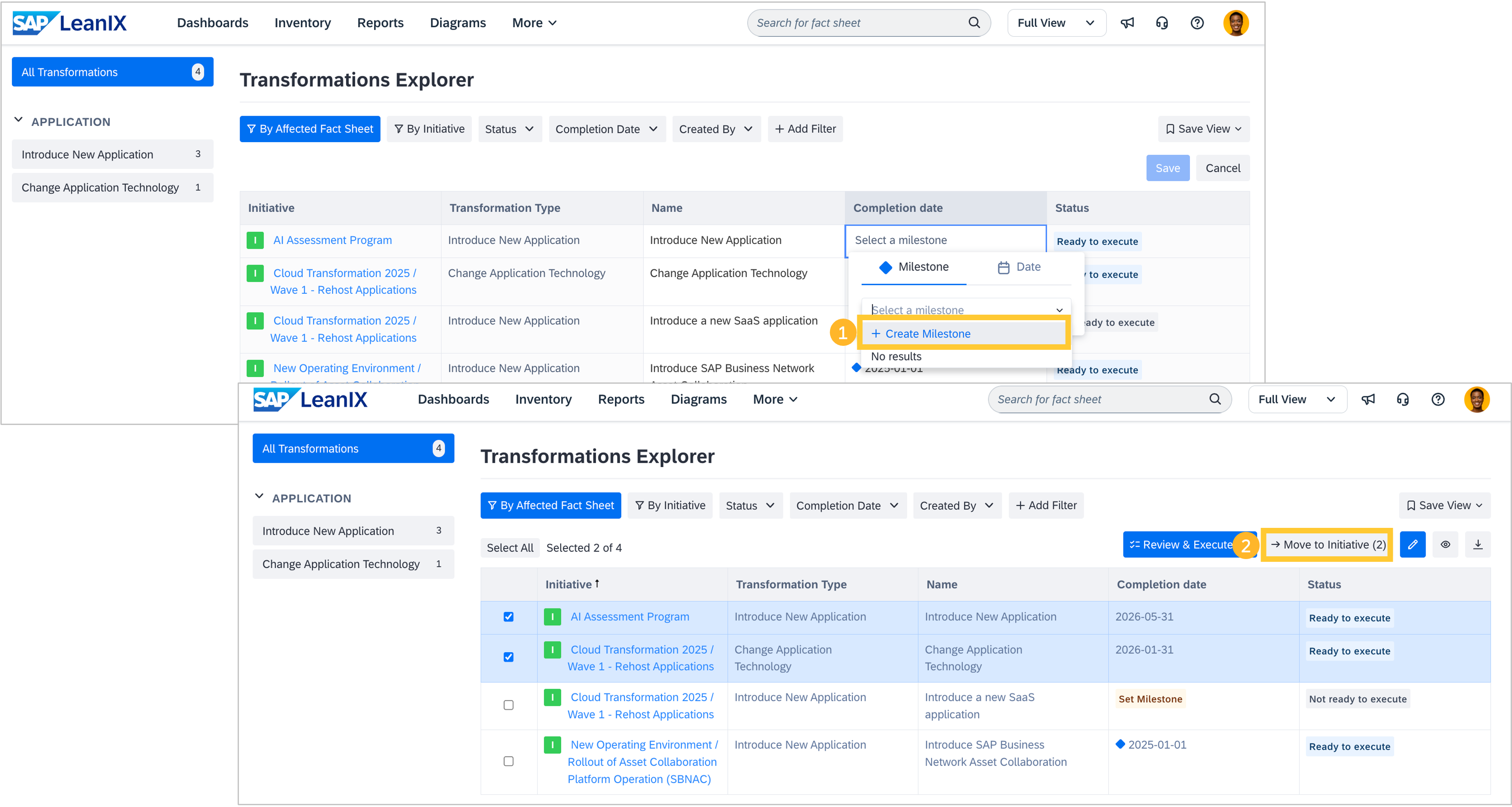
You can now create milestones directly from the date/milestone picker. Whether you are working in the transformations explorer, the transformations tab of a fact sheet, or scheduled changes, simply click "Create Milestone" in the dropdown. The new milestone is automatically selected and scoped to your initiative’s hierarchy.
You can now move multiple transformations to a different initiative at once. In the transformations explorer, select the transformations you want to reassign, then click "Move to Initiative" to choose the target. Milestones remain attached if they exist in the destination hierarchy; otherwise, they are converted to a completion date.
Meta model extensions
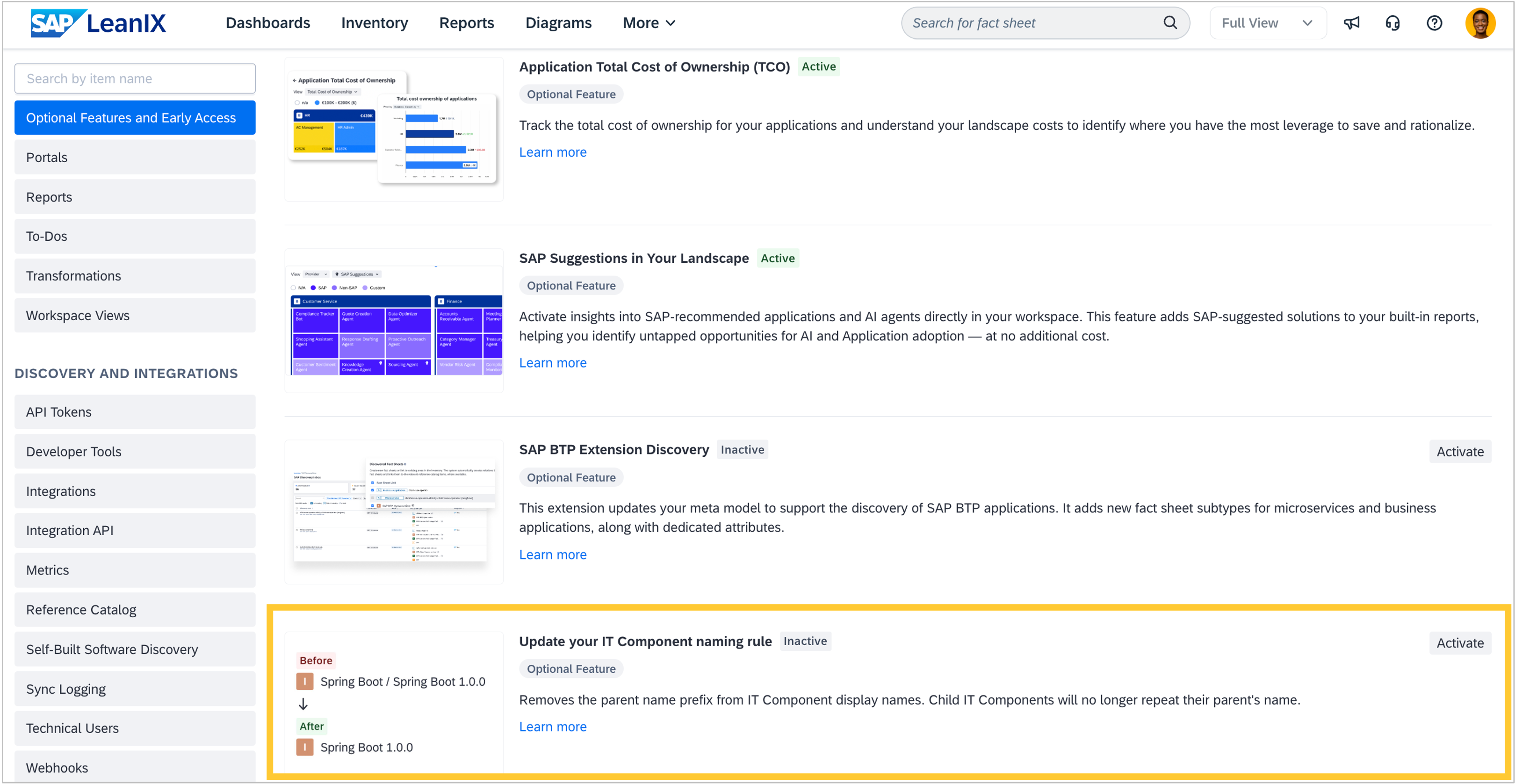
As an admin, you can now simplify the display names of IT components by activating the IT component naming rule extension. By default, child IT components inherit their parent’s name as a prefix, which can create long, repetitive names, especially when using automatic discovery. The new extension removes this prefix while preserving the parent-child relationship. To activate it, go to Administration > Optional Features and Early Access and select "Update your IT Component naming rule". This extension is only available for workspaces created before March 2026. Newer workspaces already use the simplified naming by default. Note that this change is irreversible and cannot be rolled back.
Self-built software discovery
We have made two improvements when working with self-built software discovery:
When using the self-built software discovery API or the MCP server, you can now retrieve library components for any business application, including package URLs (PURLs), licenses, related teams, and linked microservices. For example, you can identify applications using vulnerable libraries and prioritize remediation efforts. Additionally, you can now use the API and MCP server to search for SBOM library components across your workspace by Package URL (PURL). This lets you instantly identify which microservices, teams, and applications use a specific open-source library. For example, to respond to a security incident, you can search by a versioned PURL to identify which microservices use an affected component and who owns them.
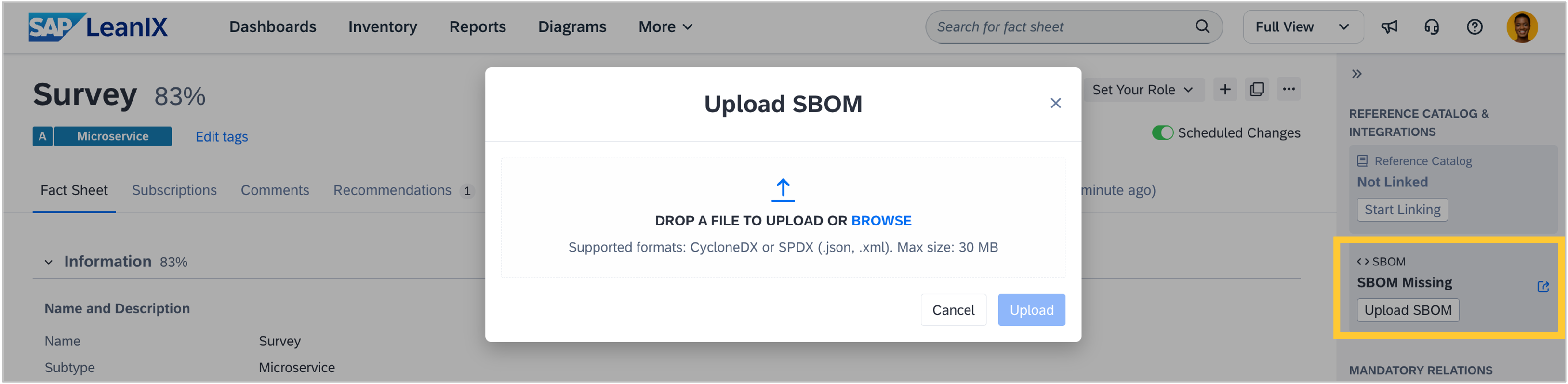
You can now manually upload SBOM files to microservice fact sheets. If a microservice is not yet connected to an automated discovery pipeline, you can upload a CycloneDX or SPDX file directly from the fact sheet sidebar to populate its software components. This is especially useful for legacy services, vendor-managed applications, or when you need immediate SBOM coverage for compliance purposes.
Reports
We fixed a bug where the "Sum up to Cluster" option in landscape reports could be enabled for non-cost fields. This setting is intended only for cost fields on relations. If you had previously enabled it for a non-cost field, the report now automatically falls back to a supported value.
KPIs
We fixed a bug that caused KPI counts to differ between the filter and preview screens in dashboards. This occurred in certain configurations involving subscription-based filters. The count is now consistent across both views.
Notifications
As announced, we updated the sender name in all automated email notifications from "LeanIX Team" to "SAP LeanIX", while keeping the same email address (support@leanix.net) and unchanged content. This affects all system-generated emails sent via the default LeanIX email delivery, including daily/weekly notification summaries, survey invitations, and to-do assignments. If you have created email rules or filters in your email provider for the sender name "LeanIX Team", you will need to update them to "SAP LeanIX". Filters and rules based on the email address (support@leanix.net) continue to work without modification. The change ensures consistent branding while maintaining all existing email functionality and formatting.