- DATE:
- AUTHOR:
- SAP LeanIX Product Team
Identify missing data on application fact sheets
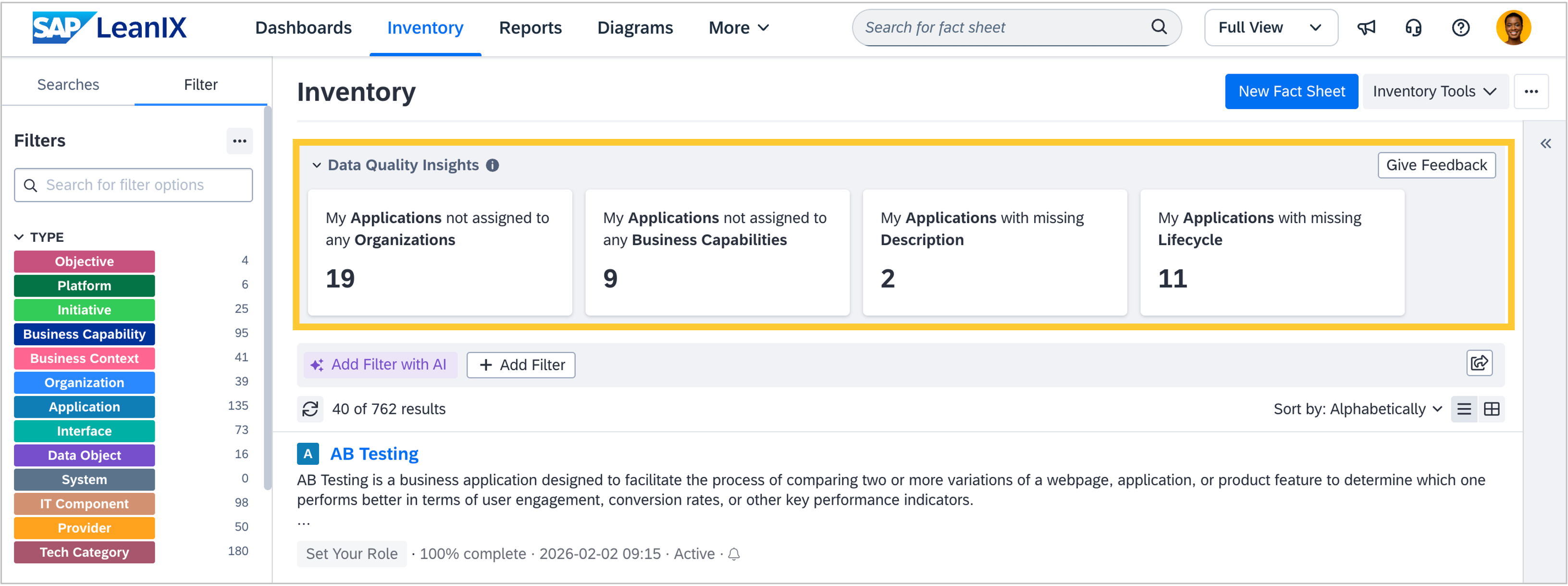
The applications in your inventory are the cornerstone of your IT landscape and many architectural decisions. To increase awareness among application owners of missing data in their applications, we have introduced data quality insights on top of the inventory.
As announced on January 20, data quality insights are an optional feature that is turned off by default in all workspaces. Admins can switch it on in the "Optional Features" section of the admin area. Once enabled, four cards will display the number of applications that lack a description, lifecycle, or relation to an organization or business capability fact sheet. They will be visible to users with edit rights who are subscribed to at least one fact sheet that lacks the above-mentioned data, regardless of subscription type or role (including custom roles). Selecting a card will filter the inventory to the respective applications lacking data. As a user, you can collapse the insights element to save space. We recommend turning on data quality insights to improve data quality in your workspace.
We are interested in receiving your feedback on this new functionality. Please use the feedback button in the top-right corner to share your thoughts and help us improve the functionality further. We will closely monitor adoption and feedback over the next weeks and assess to turn on the feature for all workspaces by the end of Q1. We will notify you at least two weeks in advance of any change and give you the possibility to keep the feature turned off.