- DATE:
- AUTHOR:
- SAP LeanIX Product Team
Weekly feature improvement and bugfix summary
Inventory
We have fixed different bugs in the inventory:
Excel imports in workspaces with large data volumes or extensive customizations — such as custom fact sheet types, custom fields, or complex relation structures — were timing out at 0% progress within the modernized import experience. This was caused by a resource bottleneck introduced during the transition from the legacy import functionality to the modernized import experience. We have resolved the timeouts by increasing the resources allocated to the import service and continue to optimize for long-term stability across workspaces of all sizes.
We have fixed an issue where fact sheet resources with extremely long URLs prevented the fact sheet from being processed and saved. Resource URLs are now limited to 153,600 characters and resource names to 1,500 characters — well above what 99% of workspaces use in practice. Existing resources that exceed these limits can still be viewed, but will prompt an error if you attempt to save them, asking you to shorten the URL or name.
We also fixed a bug where a fact sheet field was incorrectly shown as read-only due to a calculation being defined on it — even when no calculation result was stored, and the field should have been editable. Fields with calculations are now correctly editable when no calculated value is present.
When leveraging mandatory attributes, we fixed an issue where mandatory relation field validation was overly strict, blocking fact sheet saves even when the required relation was filled in. Mandatory attributes for relation fields are now validated correctly, allowing valid data to be saved.
For a certain combination of user roles and a configuration of the external ID field, cloning a fact sheet resulted in an error. This has been fixed, and cloning of fact sheets now correctly honors both field permissions and external ID field settings.
Reports
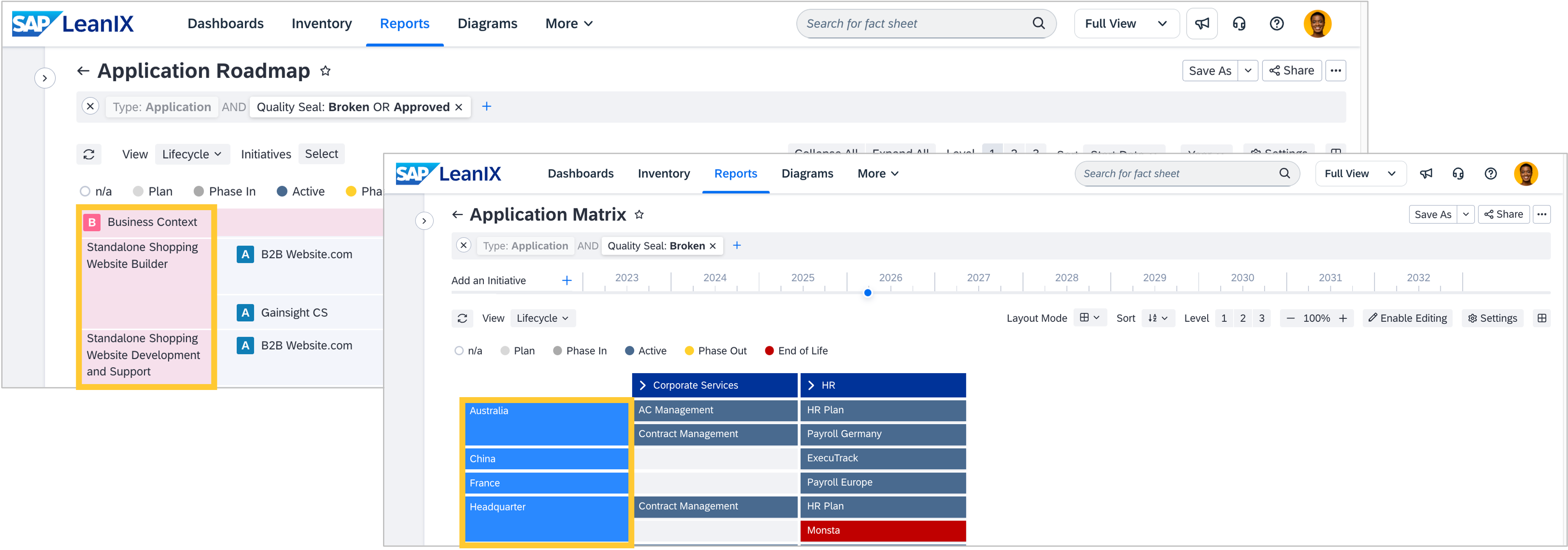
You can now resize the cluster column in roadmap reports and the first column in matrix reports, just as you can with any other column. Previously, these columns had a fixed width, causing labels to be cut off. The fix makes it easier to use your screen space effectively and read all entries without truncation.