- DATE:
- AUTHOR:
- SAP LeanIX Product Team
Sum up your landscape: Display fact sheet counts in landscape and matrix reports
Knowing how many applications support a given business capability, or how many microservices sit behind an application, is a recurring question across enterprise architecture work — whether you are assessing your portfolio to decide which applications to retire, counting applications per region, or presenting your landscape to stakeholders who need to understand the big picture at a glance.
While the rolled-up layout in landscape and matrix reports already helped answer these questions, getting totals per cluster, per bucket within report views, or across the entire report still required manual calculation.
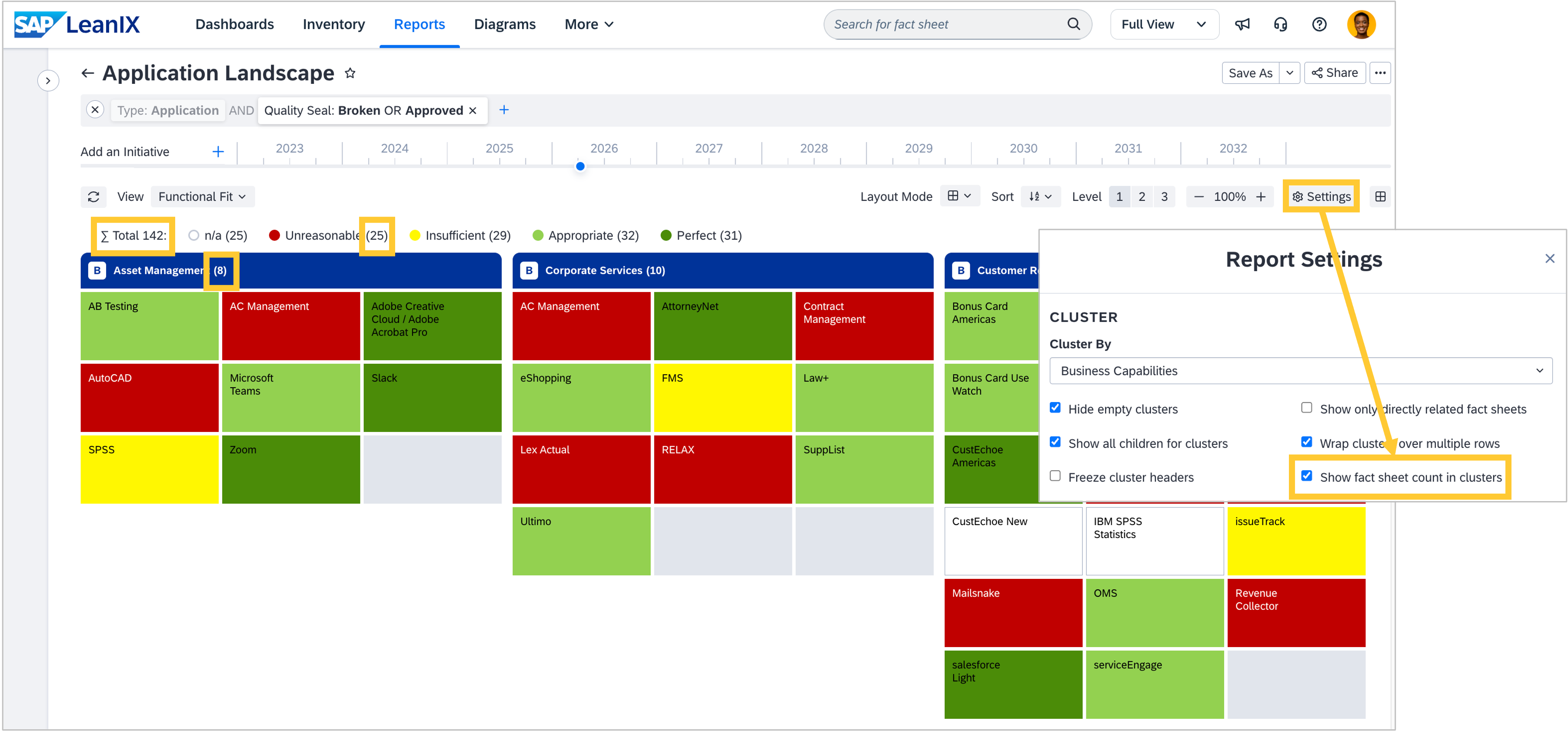
From now on, you can display fact sheet counts directly in your landscape and matrix reports. Each cluster header and bucket label shows the count of fact sheets it contains in brackets, and the total report count (∑) is displayed at the top, so you always see the full picture without leaving the report. For both report types, enable counts in the report Settings menu by checking the "Show fact sheet count in clusters" box.