- DATE:
- AUTHOR:
- SAP LeanIX Product Team
See your architecture visually in your AI client via MCP apps
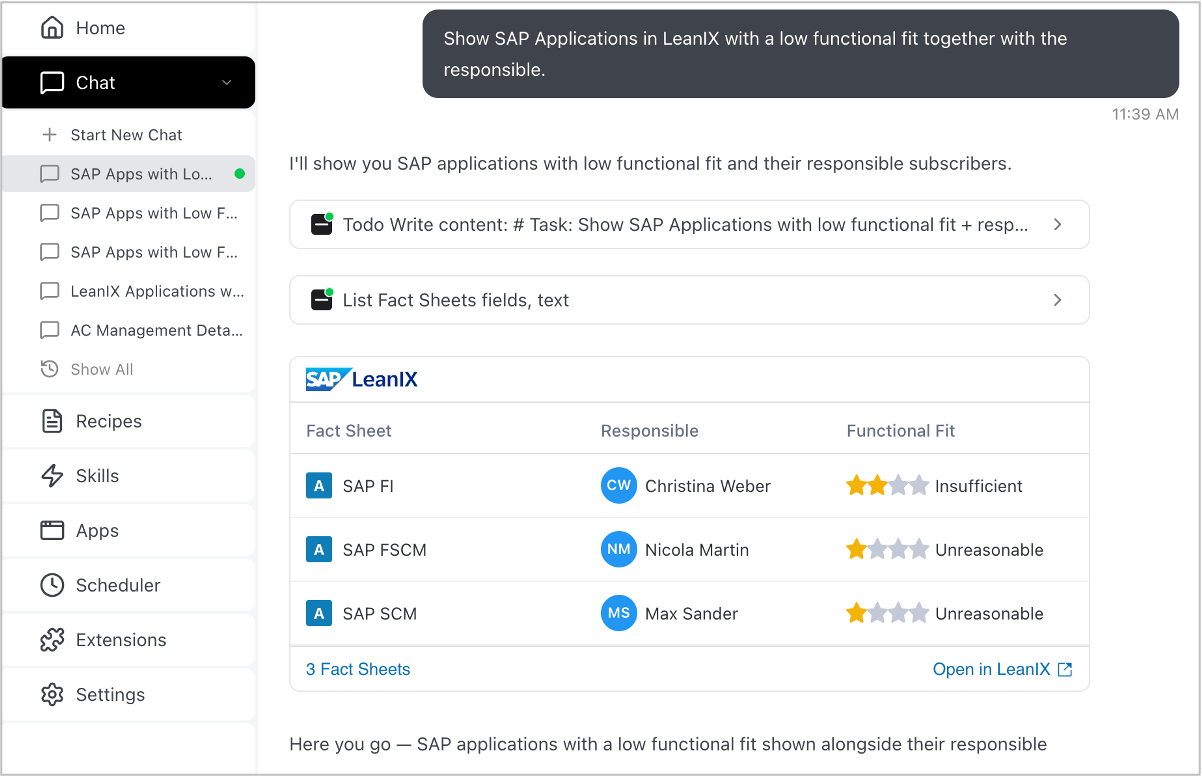
When you connect your AI client to your workspace via the MCP server, responses were previously purely text-based. Exploring a fact sheet or tracing application relationships meant switching back to your workspace to see what you actually need. MCP apps change that.
With MCP apps, you get interactive, visual representations of your architecture data directly in your AI client. No tab switching, no copy-pasting. Whether you are searching for fact sheets, reviewing the details of a specific entry, or navigating application relationships, the experience is delivered in the tool you are already working in.
The initial release includes three apps: a visual list view of fact sheet search results, a structured detail view of a specific fact sheet, and a relation explorer for navigating the relationships of any fact sheet in your inventory. All three build on your existing MCP server connection with seamless OAuth authentication, so there is nothing new to configure. This release is read-only; write capabilities are planned for subsequent releases. See the SAP Help Portal for further information.
To get started, you need signed AI terms and an active MCP server connection in your AI client. Once connected, your AI client will automatically discover and use the available apps.