- DATE:
- AUTHOR:
- SAP LeanIX Product Team
Configure and share reports using URL parameters
We added support for configuring reports in your workspace directly via URL parameters, making it easy to create and distribute tailored report views without saving multiple copies or adjusting the UI each time.
This is particularly useful for recurring reporting scenarios: instead of maintaining separate templates for each audience, you can encode the configuration in the URL and share a different link for each audience. A yearly end-of-life overview, a department-specific landscape, or a pre-filtered matrix report for a stakeholder meeting can all be generated from the same base report. URL configuration is available for most built-in report types (such as landscape, matrix, and portfolio). A few examples of what is now possible:
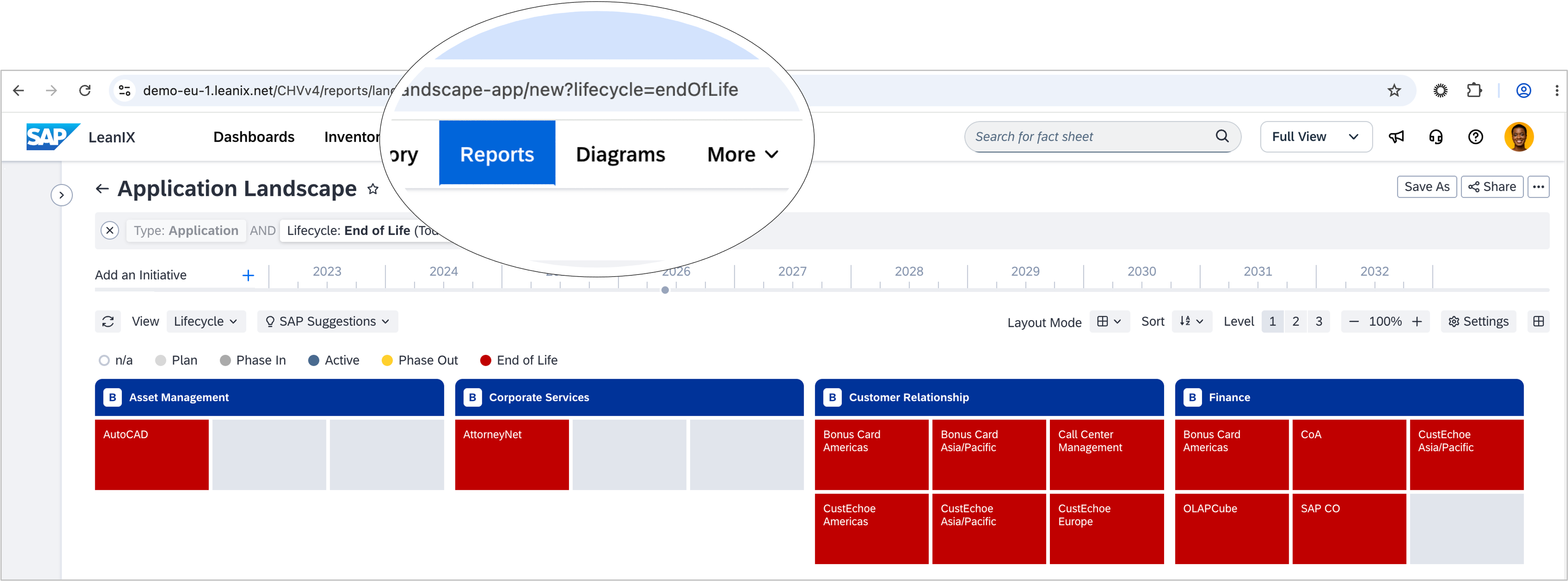
Open a landscape report pre-filtered to end-of-life applications by adding
?lifecycle=endOfLifeto the report URLCombine conditions using AND and OR logic, or exclude values with
!Filter by a related fact sheet, for example, to show only applications linked to a specific business capability, using the relation name and the fact sheet’s UUID as parameters
Create a new report instance with a predefined configuration by replacing the report ID in the URL with
new
For advanced use cases, the state parameter lets you encode the full report configuration as JSON in the URL, covering view settings, layout, zoom, and complex filters. This is useful for embedding dynamic report links in emails, intranets, or external tools, as well as for generating reports programmatically.
To quickly share your current report view, choose "Share" on the report page, then select "Copy configuration". See the SAP Help Portal for more guidance and details.