Build and open configured reports from a conversation with the EA Assistant
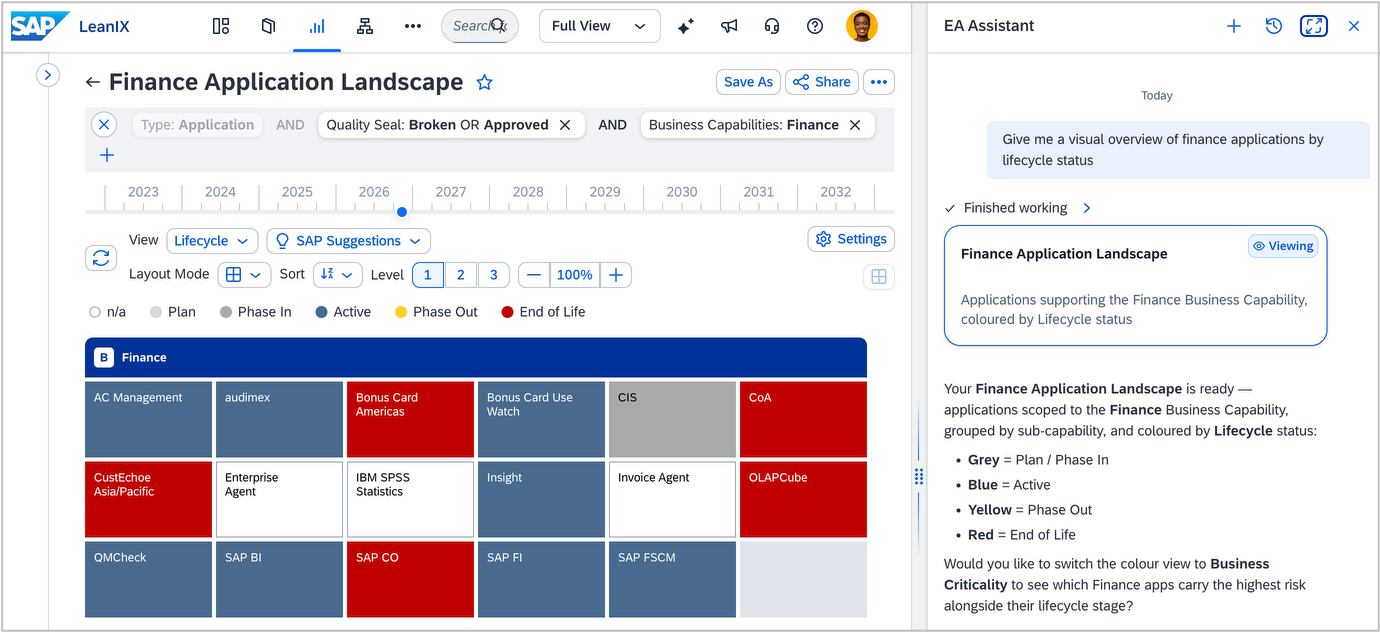
The EA Assistant can now build, configure, and open reports directly from a conversation. Describe what you want to understand about your application landscape in plain language and receive a well-configured report without needing deep knowledge of report types, clustering, filtering, or drill-down options.
Reports are among the most-used features in your workspace and among the most configuration-heavy. For new users and occasional contributors, the knowledge required to configure them well is a real barrier. They often rely on experienced architects to build the views they need, slowing time-to-insight across the organization.
Describe your goal in plain language, such as "give me a landscape of finance applications by lifecycle status" or "show technology risk across business capabilities." The assistant asks clarifying questions when they matter, determines the correct report type, clustering dimensions, and filter values based on what exists in your workspace, and provides a direct link to open the results. When a report is not the right tool, it recognizes this and points you toward other capabilities such as inventory searches, dashboards, or diagrams. In addition, the EA Assistant can help explain what a given report is for. For example, prompt "What is the Finance Application Landscape showing?"
All standard report types are supported, with purpose-built guidance for common EA scenarios including obsolescence, modernization, M&A, ERP transformation, rationalization, and AI governance. See Using Reports with AI in the SAP Help Portal.