- DATE:
- AUTHOR:
- SAP LeanIX Product Team
Weekly feature improvement and bugfix summary
Change announcements
Reports
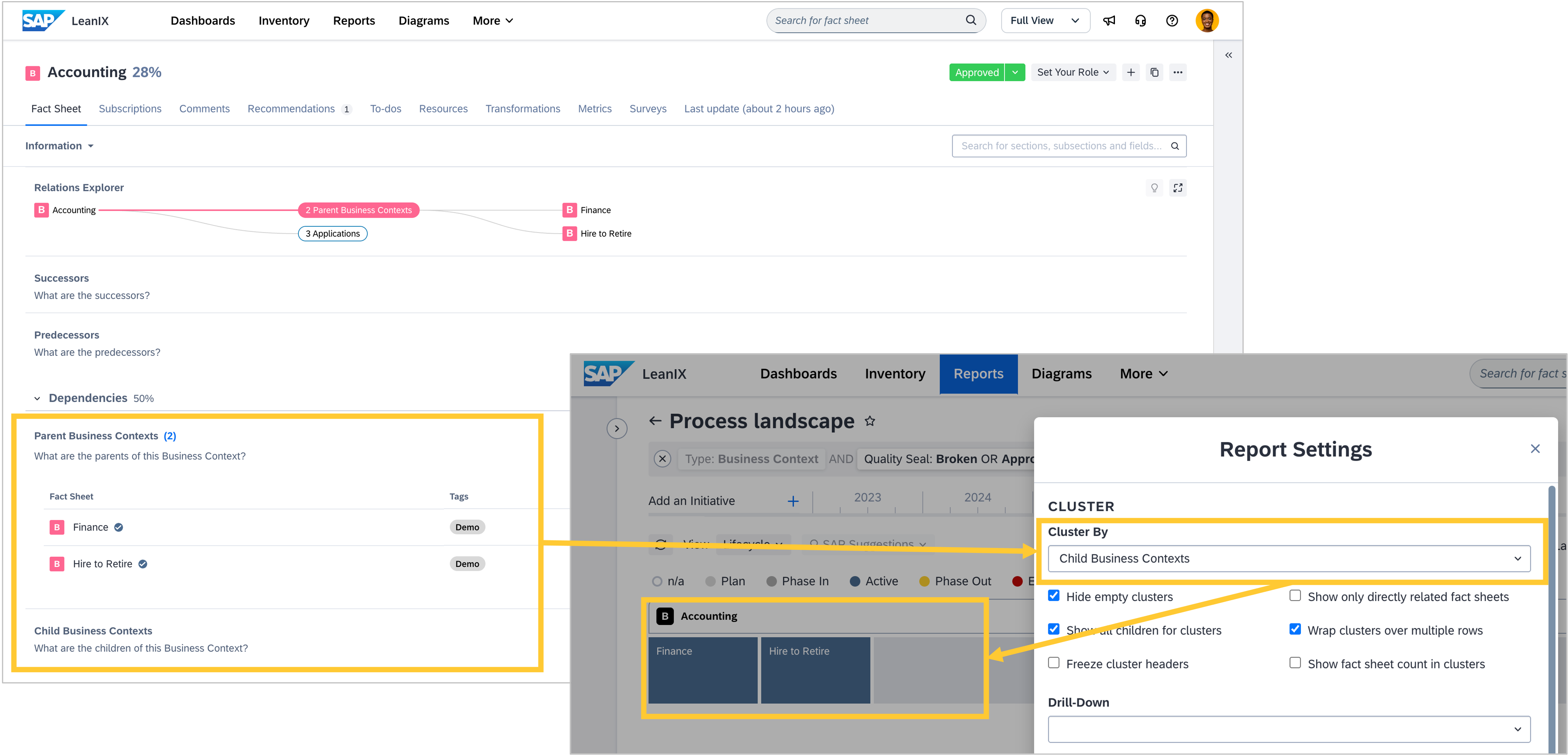
On June 29, landscape and matrix reports will change how they render process hierarchies for workspaces that use specific relations for the fact sheet type "Business Context" and its subtype "Process". If your workspace only uses the standard parent/child relation, you are not affected and do not need to read further. The relations are
relParentBusinessContextToChildBusinessContextrelChildBusinessContextToParentBusinessContextrelParentProcessToChildProcessrelChildProcessToParentProcess
These relations are typically created when configuring the SAP Signavio integration to use the recommended M:N process hierarchy, but you could have also created them manually in your workspace.
This change is related to the upcoming release of reference processes in the reference catalog, which are designed to work with the business context parent relation. To support this, the M:N rendering behavior in reports is being decoupled from the Signavio integration.
Until now, landscape and matrix reports have only rendered M:N when the Signavio integration was active and configured to use this relation. After this release, they will always render M:N rather than the standard parent/child relation, regardless of whether the Signavio integration is active when
clustering by business context parent or business context child (only on landscape reports)
building the hierarchy on the X and Y axes (both landscape and matrix report)
Reports
To comply with local regulations in China, the World Map report is currently unavailable to users accessing your workspace from China. From June 30, this will also apply to workspaces associated with contracts with a billing address in China. In both cases, the report page remains accessible, but the map itself is replaced with a notice explaining that it is not available in your region.
Integrations
Over the coming months, we will be making a series of UI improvements to the SAP Signavio integration. The integration's functionality remains unchanged. You can expect a new overview screen with key status information and general settings, a split of the basic configuration into separate process and dictionary configuration sections, and guided setup wizards that walk through the existing settings with clearer explanations. The first changes will be visible in approximately two weeks. We will keep you informed as updates are released.
Feature improvements and bug fixes
Inventory
Earlier this week, we unintentionally changed how tags are displayed on fact sheets. When tags exceed the available space, they are currently hidden behind a counter rather than shown in full. Clicking the counter incorrectly opens the tag edit mode rather than expanding the tag list. We apologize for any inconvenience this may cause. We are working on a fix that we expect to release next week and will inform you once it is live. Once resolved, tags will be shown in full by default, just as before, and you will have the option to collapse them if you prefer.

You can now share a direct link to the inventory with pre-applied filters. Use URL parameters to pre-set facet filters (
facetFilters), a full-text search term (search), or a specific list of fact sheets by ID (ids), making it easy to guide colleagues directly to the view that matters. For example, use this input if you want to filter for all applications in your inventory: https://<subdomain>/<workspace-name>/inventory/factsheets?facetFilters=FactSheetTypes:Application.
We fixed a bug where editing subscriptions using inline editing in the inventory table view would fail when the workspace was configured with granular subscription permissions. Previously, attempting to add yourself as an observer on a fact sheet with existing responsible subscribers would return an error because the mutation incorrectly replaced the entire subscription object. This is now resolved.
Diagrams
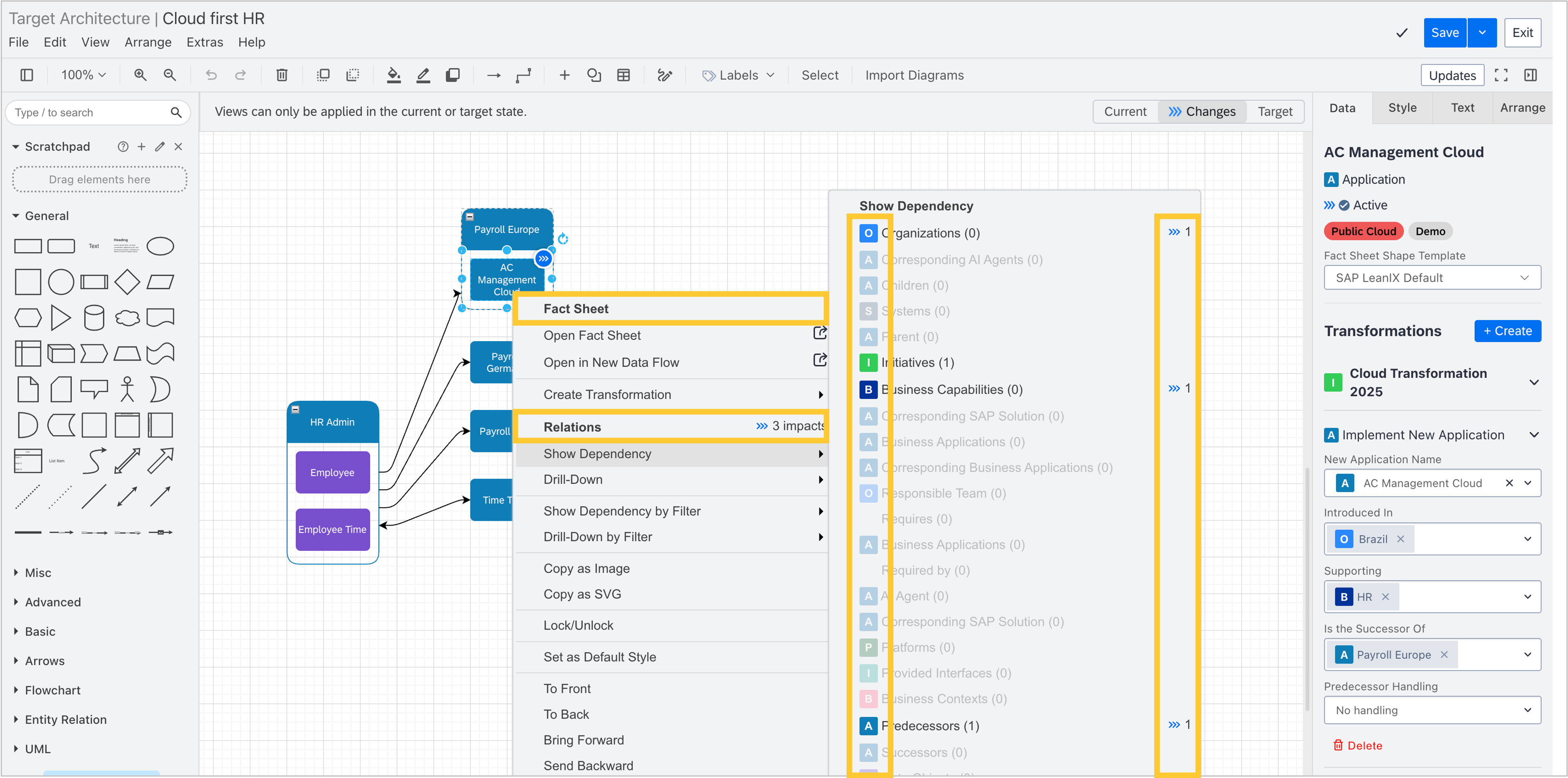
The context menu in diagrams has been redesigned for clarity and consistency. Actions are now grouped into two sections, fact sheet and relations, with fact sheet type icons alongside relation items and visual separators between sections. In target architecture diagrams available in workspaces with SAP Architecture and Road Map Planning, the impact count is shown only under the grouped relations heading, not on each individual item.
SAP discovery
You can now manage your SAP discovery inbox programmatically using the LeanIX MCP server. New tools expose read and write access to discovery inbox items, enabling AI agents and custom automations to link and reject items based on your own rules.
Architecture guidance
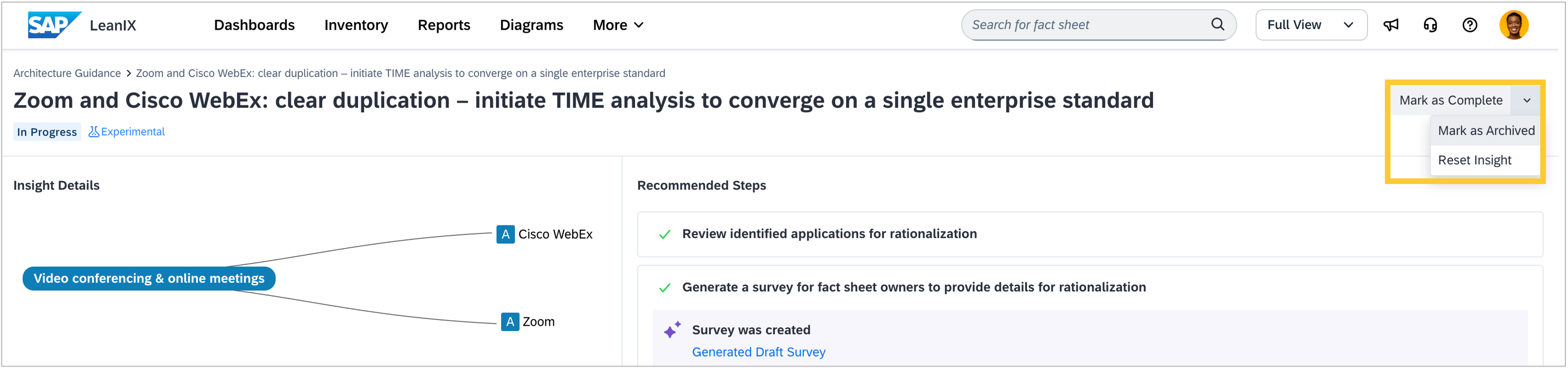
You can now archive insights that are not relevant to your business context. Previously, the only options were to mark an insight as done or reopen it. A "Mark as Archived" action is now available to remove irrelevant insights from your view, and a "Reset Insight" option lets you revert an insight to its original state. Archived insights are hidden from the default view but can be found by filtering for the "Archived" status.
Architecture decisions
We have improved the architecture decisions tools in the LeanIX MCP server. AI agents connected to your workspace can now more reliably create, retrieve, and update decisions conversationally, without switching to the workspace UI.
Self-built software discovery
For workspaces with SAP LeanIX Technology Risk and Compliance, you can now ingest SBOMs that contain components without a package URL (purl). Previously, components without a valid PURL were rejected during ingestion. They are now accepted and displayed in the SBOM explorer with a "No Purl" badge, and the SBOM view shows the count of components in an upload that lack purls. You can optionally configure custom tech stack rules to match purl-less components.