- DATE:
- AUTHOR:
- SAP LeanIX Product Team
Weekly feature improvement and bugfix summary
Inventory
We fixed a bug that prevented the lifecycle bar from being displayed correctly on the fact sheet details page when navigating there from the "Recently Viewed" section of the inventory's right side panel. This has now been fixed, so the lifecycle bar is always shown and refreshed each time you open a new fact sheet.
Reports
Landscape reports now support sticky cluster headers that remain visible while scrolling, helping you maintain context as you navigate multi-level hierarchy structures. You can enable or disable the functionality in the landscape report's settings modal.
Diagrams
We added two features for free draw and data flow diagrams:
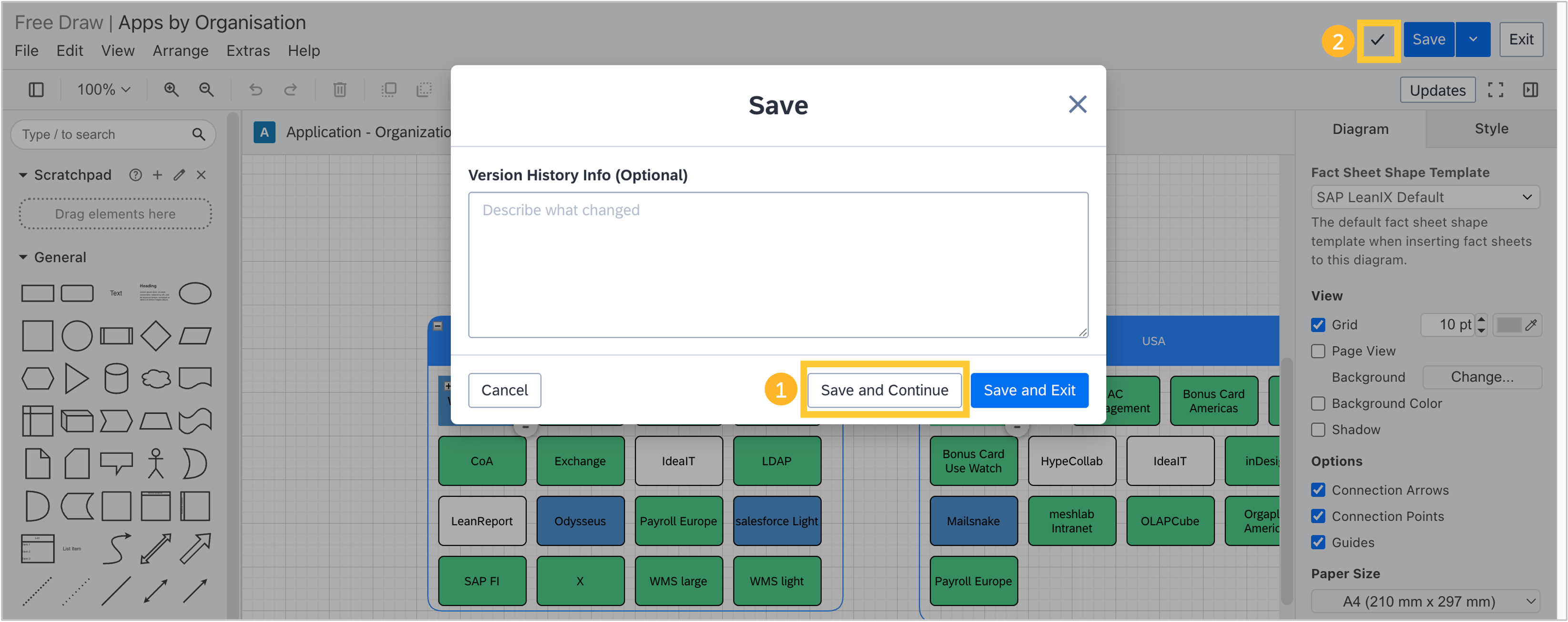
When in edit mode, you can now save a diagram and stay in edit mode to continue working on it. Previously, saving a diagram automatically opened the view mode, and you had to navigate back to edit mode to continue editing. Now, when you click "Save", you can choose a new "Save and Continue" button.
We added an indicator that tells you whether the auto-save process of a draft diagram was completed. The indicator is placed to the left of the "Save" button in edit mode. This is specifically relevant for large diagrams where changes take some time to process.
If you are reading these announcements from your email inbox, embedded videos might not get displayed. Please visit updates.leanix.net to view this announcement, including embedded videos.